DVDFab Blu-ray Creator 10.2.1.7
- Buy $42.90
- Developer Link 1 (non https DVDFab10217.exe)
- Download3k US (DVDFab10217.exe)
- Download3k EU (DVDFab10217.exe)
MD5: 57cb5bdb332bf4d7929ba32f35a8907d
All files are original. Download3K does not repack or modify downloads in any way. Check MD5 for confirmation.
Review & Alternatives
"A powerful and professional Blu-ray creator."
Overview
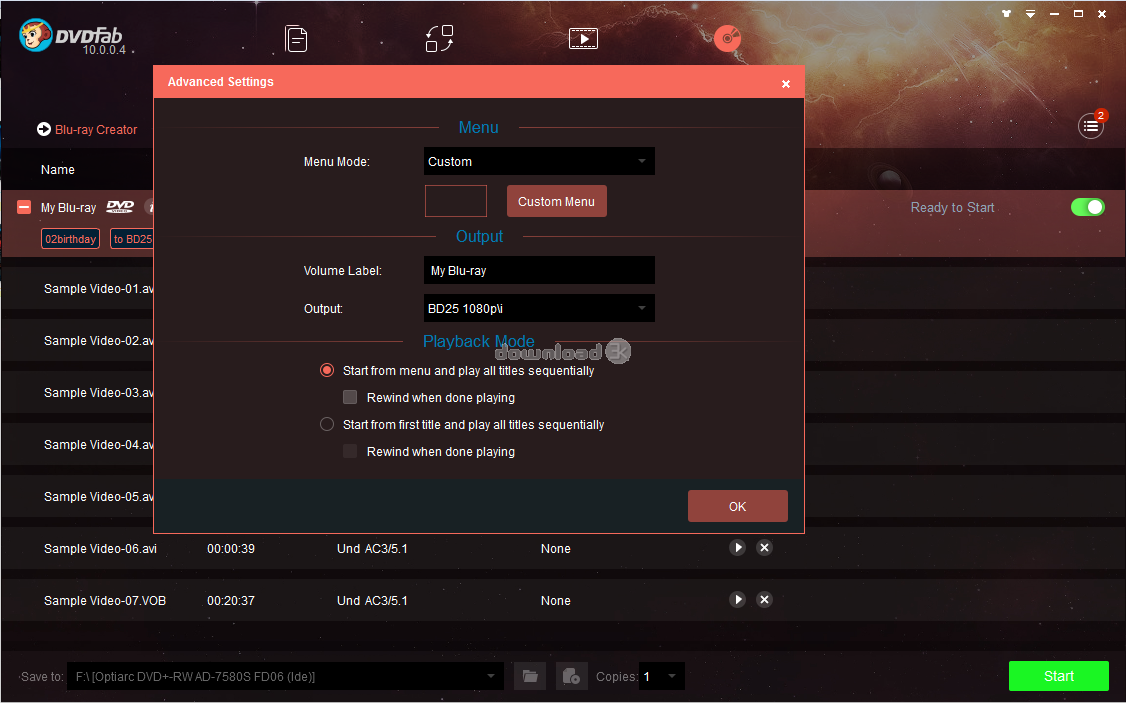
DVDFab Blu-ray Creator is a powerful Blu-ray burning software that lets you burn high-definition or standard-definition video onto Blu-ray discs quickly and easily. With full-fledged compatibility for both input (video files) and output (Blu-ray discs), this application offers an all-inclusive solution.
Installation
With a file size of about 20 MB, DVDFab Blu-ray Creator downloads and installs effortlessly, consuming very little disk space. The wizard-style setup guide walks you through the process of completing the installation step-by-step, but be aware that you may be asked to install some third-party toolbars or software. The system requirements are nominal, requiring only the latest Windows operating systems (including XP, Vista, and 7 - both 32-bit and 64-bit).
Interface
The user interface is extremely simple to learn how to use, with self-explanatory file input boxes and labeled icons that provide access to all of the main features. With an intuitive design layout, wide-open comfortable functionality, and real-time displays of progress statistics, this software makes burning Blu-ray discs an enjoyable process. To initiate a burning process simply choose a video folder/file as the source input, and then designate a target drive for the information to be burned to.
Pros
-
Can convert/burn videos in all major formats, including MP4, MKV, AVI, TS, M2TS, WMV, MOV, WMA, FLV, 3GP, VOB, M4V
-
Supports a variety of Blu-ray output formats, including BD-RE, BD-R, BD-50,BD-5, BD-9, and BD-25
-
Can burn video on any type of Blu-ray or AVCHD discs
-
Convert videos into a Blu-ray folder and save it to your hard drive to be burned or viewed later
-
Supports several industry-standard technologies, including multithreading capabilities, and compatibility with Nvidia CUDA
-
Merge multiple video files into one Blu-ray disc
-
Load external subtitles onto a Blu-ray to enjoy subtitled movies and videos
-
Can be set to automatically shutdown your computer after completing an operation
-
Utilizes state-of-the-art techniques to facilitate expeditious burning and file conversion times
-
View real-time statistics that provide detailed progress information during the burning and conversion processes, including an integrated source video previewer
-
Outperforms many other Blu-ray disc burners by focusing system resources towards burning and conversion, and by utilizing Intel Quick Sync technology
-
Convert video files to Blu-Ray folder or choose to burn them to Blu-ray disc instead
Cons
-
User interface is very primitive and lacks advanced features. However, the simplicity is favored by some users who are only seeking basic Blu-ray disc burning capabilities
Alternatives
Other software that lets you burn Blu-ray discs include IMGBurn, InfraRecorder, CDBurnerXP, and NERO Burning ROM. However, these utilities are all-inclusive solutions that let you burn DVDs, CDs, and Blu-ray discs, whereas DVDFab Blu-ray Creator only specializes in Blu-ray disc burning.
Conclusion
If you're looking for a way to play video files that are stored on your PC in your Blu-ray player, or burn high-definition video onto Blu-ray disc to take your entertainment experiences to the next level, DVDFab Blu-Ray Creator is an ideal option that offers the basic features needed to burn Blu-Ray discs.

Requirements: Pentium II 500MHz, 512MB of RAM, 10GB of Free Hard Disk Space, A Blu-ray Drive
What's new in this version: 1.Added the support for some new Java protections.2.Improved the support for the BluPath feature on Blu-rays and the PathPlayer feature on DVDs.3.Fix a crash problem when opening DVD discs in certain cases.
Antivirus information
-
Avast:
Clean -
Avira:
Clean -
Kaspersky:
Clean -
McAfee:
Clean -
NOD32:
Clean

Popular downloads in MP3 Audio Video
-
 Realtek High Definition Audio Driver for 2000/XP/2003 32/64-bit R2.74
High definition audio driver from Realtek. -
 3GP Player 2013 1.4
Free 3GP Player for Pc -
 iTunes 12.13.7.1
Manage and play your music collection. -
 Windows Media Player 11
One of the best media player -
 Total Video Converter 3.72
Total Video Converter -
 TVexe TV HD 6.0
Watch free live TV on your PC now+ Radio -
 K-Lite Codec Pack Full 18.9.0
A collection of codecs and related tools. -
 Windows Media Player 9 Codecs Pack
The latest Windows Media codecs -
 VLC media player 3.0.21
A portable app of VLC media player. -
 KMPlayer 4.2.3.21 x86 / 2025.1.21.12 x64
A movie and audio player.


-
OS
Win7 x32,Win7 x64,WinVista,WinVista x64 -
License
Shareware -
Price
$42.90 Buy -
Updated
5/12/2020 -
Downloads
2534 (1 last week) -
Size
137.91 MB -
MD5
57cb5bdb332bf4d7929ba32f35a8907d -
SHA1
ea61b6749dc5310929fc7b80a6d0302215348ed2 -
Developer
Fengtao Software Inc.