Able Video Snapshot 1.24.8.26
Developed by GraphicRegion.com
-
Windows
-
setup file videosnapshot_setup.exe (5.11 MB)
-
Shareware
Buy or select mirror:
- Buy $9.95
- Developer Link 1 (non https videosnapshot_setup.exe)
- Developer Link 2 (non https videosnapshot.zip)
- Download3k US (videosnapshot_setup.exe)
- Download3k EU (videosnapshot_setup.exe)
MD5: 65670f7836d7d1beaa1797cd74205f2c
All files are original. Download3K does not repack or modify downloads in any way. Check MD5 for confirmation.
Developer Description
"Lets you take snapshots from your movie!"
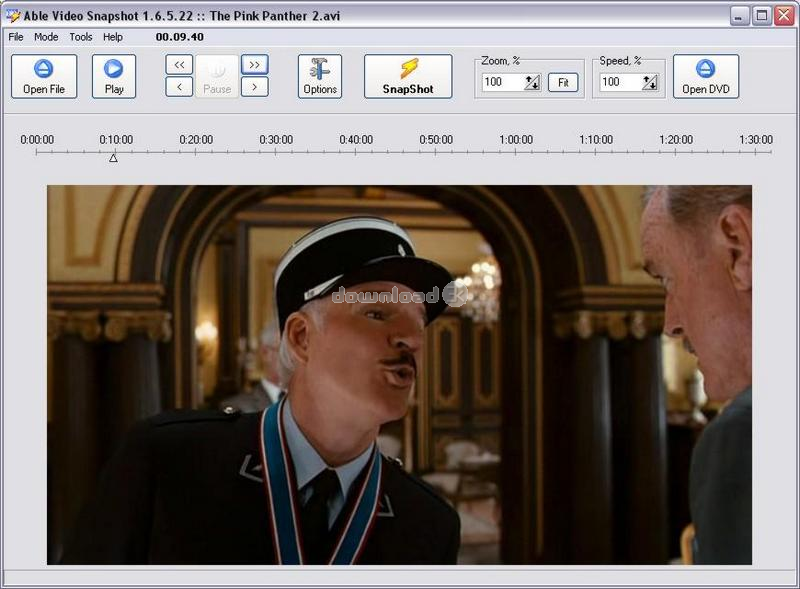
How to take a snapshot of your video within Able Video Snapshot?The program lets you take snapshots directly from your movie!
This means you can go to any point within a video clip,
capture a freeze frame picture, and save this image to your computers hard drive.
There are many uses for these snapshots.
You can use these video pictures to create title slides.
I like to find an interesting video scene that seems to symbolize my movie and capture a snapshot of it.
You could also add a title directly to the picture using a photo-editing program.
You could e-mail hi-light pictures of your video to friends and family.
Not everyone can receive or view videos, so these pictures are a great alternative
(and they don't take as long to download).
You can also use the snapshot feature to transform your camcorder into a low-resolution digital camera. Simply point your camcorder at your subject and later you can go through your video and take virtual snapshots directly off the captured video.
The actual process of taking these snapshot is quite easy.
While viewing a video clip in the preview monitor, pause the clip at an appropriate spot,
and click the "SnapShot" button under the preview monitor.
Program will then ask you where you would like to save the picture.
Requirements: Pentium-400, 64 MB RAM
What's new in this version: + New feature: Color Adjust - Contrast, HSV, HSL, RGB, Equalization, FFT, Gamma correction, Sharpen("Edit" dialog box) + New feature: Effects - User filter, Bump map, Lens, Wave, Morphing filters, Rotate("Edit" dialog box) + New feature: Auto Equalize ("Edit" dialog box) + New feature: Undo ...
Antivirus information
Download3K has downloaded and tested Able Video Snapshot on 27 Aug 2024 with some of Today's best antivirus engines and you can find below, for your convenience, the scan results:
-
Avast:
Clean -
Avira:
Clean -
Kaspersky:
Clean -
McAfee:
Clean -
NOD32:
Clean

Popular downloads in MP3 Audio Video
-
 Realtek High Definition Audio Driver for 2000/XP/2003 32/64-bit R2.74
High definition audio driver from Realtek. -
 3GP Player 2013 1.4
Free 3GP Player for Pc -
 iTunes 12.13.7.1
Manage and play your music collection. -
 Windows Media Player 11
One of the best media player -
 Total Video Converter 3.72
Total Video Converter -
 TVexe TV HD 6.0
Watch free live TV on your PC now+ Radio -
 K-Lite Codec Pack Full 18.9.0
A collection of codecs and related tools. -
 Windows Media Player 9 Codecs Pack
The latest Windows Media codecs -
 VLC media player 3.0.21
A portable app of VLC media player. -
 KMPlayer 4.2.3.21 x86 / 2025.1.21.12 x64
A movie and audio player.
User rating
3/5 (1 votes)
Good
Your rating

-
OS
Win2000,WinXP,Win7 x32,Win7 x64,Windows 8,Windows 10,WinServer,WinOther,Windows2000,Windows2003,Wind -
License
Shareware -
Price
$9.95 Buy -
Updated
8/27/2024 -
Downloads
1305 (1 last week) -
Size
5.11 MB -
MD5
65670f7836d7d1beaa1797cd74205f2c -
SHA1
b7e4de3ea6c1e8638f73954595286bdeac263233 -
Developer
GraphicRegion.com