Schematic 3.17
Developed by Dot Software Ltd.
-
Windows
-
setup file SCHEMATIC_Eval_NS.exe (3.05 MB)
-
Shareware
Buy or select mirror:
- Buy $29
- Developer Link 1 (non https SCHEMATIC_Eval_NS.exe)
- Download3k US (SCHEMATIC_Eval_NS.exe)
- Download3k EU (SCHEMATIC_Eval_NS.exe)
MD5: 0d259da91b7deecdd2bfbafc82ba1aaa
All files are original. Download3K does not repack or modify downloads in any way. Check MD5 for confirmation.
Developer Description
"A vector graphics diagramming tool"
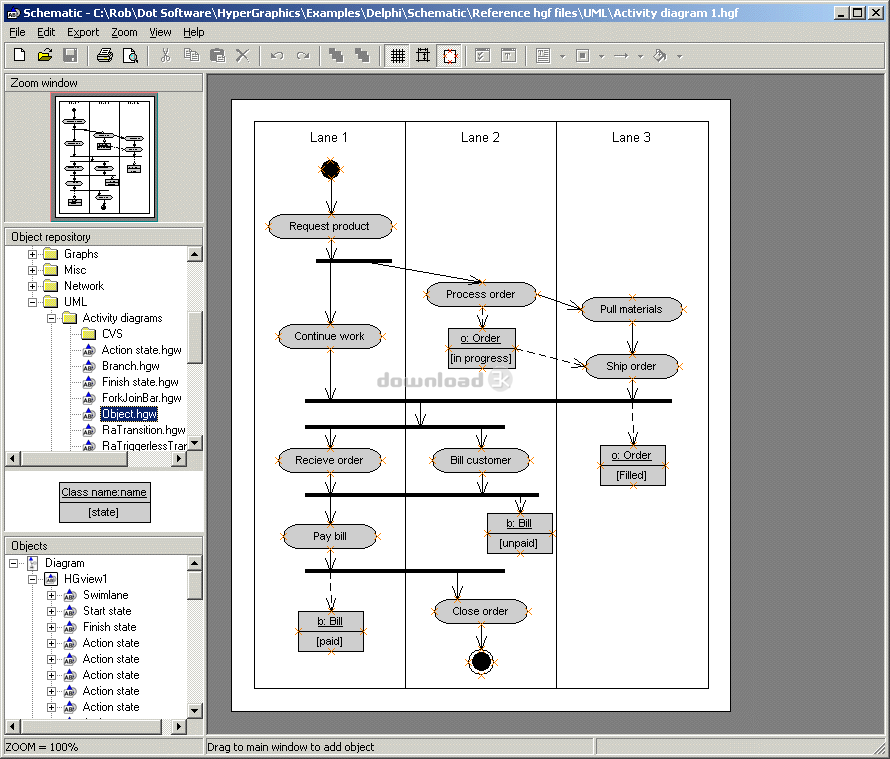
Schematic is a diagramming tool that allows you to combine text, pictures, shapes and connectors to create clear and informative diagrams. Schematic has a clean and easy to use GUI, including a tree-view for easy object navigation, an object preview window and a zoom/pan window. Schematic also features full undo/redo functionality.One of Schematic's powerful drawing features is the way that connectors and sockets work. Connectors allow visual connections to be made between graphical objects. These connections are both visual and logical, meaning that when graphical objects are moved any connector objects attached to them are automatically adjusted to maintain the connection. Connectors will snap to object perimeters or any existing socket objects which define specific snap locations. A variety of different connectors are available including Bezier, right-angled and forked connectors.
All objects can be snapped to specific locations on the page. The snap location spacing can easily be adjusted.
Schematic comes with a variety arrow types including pointed, diamond and circular. Arrows can be situated at end-points and at specific locations along a line or connector.
Schematic comes supplied with a rich collection of specialist objects known as widgets. These can be accessed via the object repository and exist in a hierarchy so that they can be located easily. Schematic comes supplied with many specialised graphical libaries including UML, electrical, network, flowchart, DFD and ERD libraries.
Users can easily create there own widgets for later inclusion in diagrams. A widget can simply be an existing object that has been customised by having some of its properties changed or be an existing drawing object with other drawing objects attached to it as children. The supplied sets of widget files were all created as user-defined widgets using Schematic.
Schematic includes print preview support and the export of diagrams as EMF, PNG and JPG files.
Antivirus information
Download3K has downloaded and tested Schematic on 12 Jan 2026 with some of Today's best antivirus engines and you can find below, for your convenience, the scan results:
-
Avast:
Clean -
Avira:
Clean -
Kaspersky:
Clean -
McAfee:
Clean -
NOD32:
Clean

Popular downloads in MP3 Audio Video
-
 Realtek High Definition Audio Driver for 2000/XP/2003 32/64-bit R2.74
High definition audio driver from Realtek. -
 3GP Player 2013 1.4
Free 3GP Player for Pc -
 iTunes 12.13.7.1
Manage and play your music collection. -
 Windows Media Player 11
One of the best media player -
 Total Video Converter 3.72
Total Video Converter -
 TVexe TV HD 6.0
Watch free live TV on your PC now+ Radio -
 K-Lite Codec Pack Full 18.9.0
A collection of codecs and related tools. -
 Windows Media Player 9 Codecs Pack
The latest Windows Media codecs -
 VLC media player 3.0.21
A portable app of VLC media player. -
 KMPlayer 4.2.3.21 x86 / 2025.1.21.12 x64
A movie and audio player.
User rating
1/5 (1 votes)
Poor
Your rating

-
OS
Win95,Win98,WinME,WinNT 3.x,WinNT 4.x,Windows2000,WinXP -
License
Shareware -
Price
$29 Buy -
Updated
1/12/2026 -
Downloads
663 (1 last week) -
Size
3.05 MB -
MD5
0d259da91b7deecdd2bfbafc82ba1aaa -
SHA1
b0e9ce31c4c00e72c013246c4bb91c6a44bc3452 -
Developer
Dot Software Ltd.