Ashampoo Photo Converter 3 3.0.3
- Buy $15
- Developer Link 1 (ashampoo_photo_converter_3.exe)
- Download3k US (ashampoo_photo_converter_3_3.0.3.exe)
- Download3k EU (ashampoo_photo_converter_3_3.0.3.exe)
MD5: cf19ef12d3cb8941029b8d1a4ef4f3aa
All files are original. Download3K does not repack or modify downloads in any way. Check MD5 for confirmation.
Review & Alternatives
"Modern image batch conversion with CLI support"
Overview
Ashampoo Photo Converter 2 is the finest choice you can go with if you want to convert and edit your images using a convenient, powerful and versatile program. Now you can convert your images from one format to another easily, supporting a wide variety of image file types. But you might want to resize them beforehand, adjust the colors, insert watermark or add effects like sharpen, blur, and drop shadow. Those are just a few of Photo Converter’s many features, packed in this small and lightweight program.
Installation
The installation procedure is the same like in any of Ashampoo’s products. If you’re not familiar with the process, then don’t be intimidated; it is very easy and short. When you launch the installer you will be prompted to select the language to be used for the installation. You can view the system requirements in the next window that appears, by clicking on the “Show System Requirements” button at the bottom left corner. A few steps afterwards you will have to choose if you want to perform an Express or Custom installation. Express will install all components in the package, along with MyAshampoo toolbar. This will also set your homepage and default search to MyAshampoo web search. If you want to review those changes, pick the custom installation. The main installation will begin in the next step.
The program can run under Windows XP, Vista, 7 and 8 (both 32 and 64-bit editions supported).
Interface
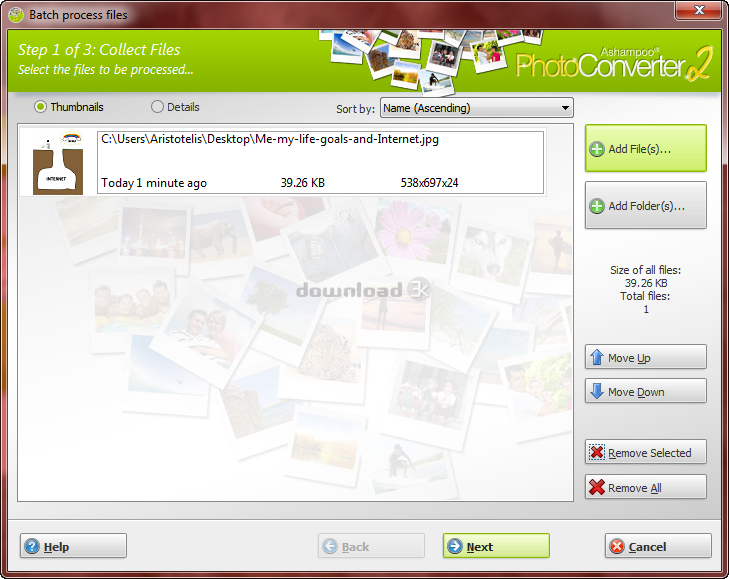
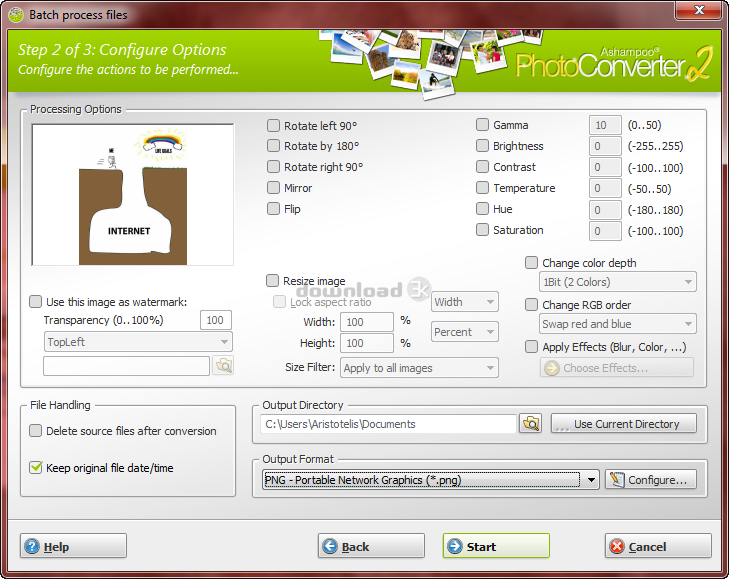
The modern and simple interface will not give you a hard time using the program. As soon as you open it, a welcoming window will appear with a few buttons at the top and a big “Start Converter!” button in the center. Clicking that button will get you to the main screen, where you get to process your files. It consists of 3 steps: the image selection step; where you select the images you want, the configuration step; which is where the settings to the pictures are made as well as the output format is chosen, and in the last step the actual operation is performed.
Pros
It is very easy to convert an image. Simply start a conversion task, add the images you want and select the desired output format. Supported files types are: APCDOC, BMP, GIF, JNG, JPG, JP2, JXR, MNG, PCX, PDF, PIX, PNG, PPP, RAS, SGI, TGA, TIF, PNM, PBM, PPM and PGM.
Apart from being an image converter, it can be used as an image editor as well. It has features that allow you to rotate/flip/mirror images, resize them, optimize them by altering colors and contrast, edit them by using effects such as blur, sharpen, grayscale, radial blur, drop shadow, edge detection, emboss, outline, pixelize, solarize etc. or add watermark in a specified position. In the preview area you can see all the changes made applied to the image.
In addition, you have the option to delete the source file after conversion and keep fileoriginal file date and time in the new file.
Cons
The preview area is very small and cannot be enlarged. This makes it difficult to see some of the changes made.
Alternatives
BatchPhoto (paid) is a tool used to convert your images and edit them, sharing many common features with Ashampoo Photo Converter. You can optimize, transform and add effects to your pictures, but in contrast to Photo Converter it gives you the ability to convert between more than 130 file formats. In addition, you can make edits on photos directly from within Explorer’s right-click menu. Fixpicture is a free online tool to convert your images and make basic changes such as resizing and rotating them.
Conclusion
Ashampoo Photo Converter is an excellent choice if you often want to convert images, or just want to edit them without buying overpriced image editing tools that are hard to use anyways. Even if you are not satisfied after buying it there is a 30-day money back guarantee, just like in any Ashampoo product. Give it a go today!

Requirements: Operating System Windows® 11, Windows® 10 (x64) Requirements Any device that supports the ope…
Antivirus information
-
Avast:
Clean -
Avira:
Clean -
Kaspersky:
Clean -
McAfee:
Clean -
NOD32:
Clean

Popular downloads in Photo & Graphic
-
 Bandicam Screen Recorder 8.3.0.2533
Best Game, Video, Screen Recording Software -
 PhotoScape 3.7
A fun and easy photo editing software. -
 Magic Photo Editor 7.5
Easilly blend photo onto another picture. -
 SketchUp Make 16.1.1450 32-bit / 17.2.2555 64-bit
An easy-to-learn 3D modeling program. -
 jAlbum 39.6
Highly customizable web galleries for any site. -
 Shipping Container House Plans 1.1
Shipping Container House Plans Software -
 Corel PaintShop Pro 2023 25.2.0.58 Update 2
All you need to create fantastic photos! -
 Just Color Picker 6.2
Free colour picker and colour-editing tool. - JR Split File 1.2
Split a large file into smaller files -
 progeCAD Smart! free DWG CAD 9.0.28.8
progeCAD Smart! free personal CAD software


-
OS
WinOther -
License
Shareware -
Price
$15 Buy -
Updated
6/24/2026 -
Downloads
667 (1 last week) -
Size
28.57 MB -
MD5
cf19ef12d3cb8941029b8d1a4ef4f3aa -
SHA1
d61b84de0749eb51d169884a4c5886fb695e36df -
Developer
ashampoo GmbH & Co. KG