MediaCodeSpeedEdit 1.2.0.10
- Developer Link 1 (non https MediaCodeSpeedEdit.zip)
- Developer Link 2 (non https MediaCodeSpeedEdit.zip)
- Download3k US (MediaCodeSpeedEdit.zip)
- Download3k EU (MediaCodeSpeedEdit.zip)
MD5: 4c83ad64a32919db0161966f866f0ec9
All files are original. Download3K does not repack or modify downloads in any way. Check MD5 for confirmation.
Quick Review
"Change the write speed for your media."
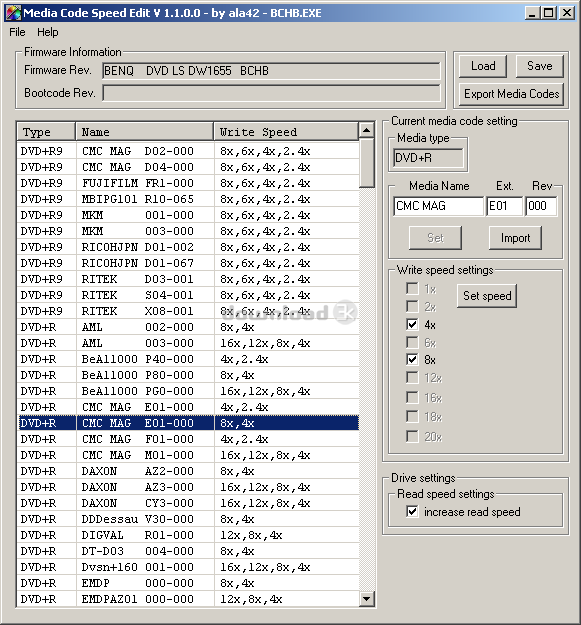
MediaCodeSpeedEdit is a powerful and versatile software that allows users to modify their DVD writer firmware to adjust writing speed limits and rename media codes. The software is compatible with most LiteOn, Benq, PHILIPS, HP, LG, NEC, newer PIONEER, Cyberhome DX162D-A and a few BTC, Gigabyte, Samsung and Artec DVD writer firmwares. It supports raw .bin and .hex, .cvt and Benq/Philips/LG/NEC .exe format firmwares and unscrambled LiteOn .exe flasher.
The software's key features include the ability to adjust DVD writing speed limits, renaming of media codes with manually entered or imported media codes, and lossless strategy swapping for Benq DW822/1620/1640, NEC 3520/3540/4550, and Pioneer 109/110 type firmwares by double clicking the media code. It also includes a DVD read speed patch for Benq DW1620/1640 and LG 4163/4167 drives type firmwares allowing 16x read speed.
Using MediaCodeSpeedEdit is straightforward. Users can download the firmware they want to modify and then load it into the software. To increase the read speed, users simply click the increase read speed checkbox. To increase the write speed, they can double click the media code they want to change and select the write strategy they want to use instead. This requires a bit of trial and error. To teach the firmware a new media code name, users can select an unused media code of the same media type from the list and rename it by modifying the Media Name/Ext/Rev fields on the right. They can also import the media name by clicking the import button and following the displayed instructions. Once done, users can click the set button. It's worth noting that the original media code will not be supported by the firmware anymore.
With some firmwares, users can directly modify the write speeds using the write speed checkboxes and clicking the Set Speed button. Greyed out checkboxes mean this feature is not available. Once users have made all the necessary changes, they can save the firmware and flash the modified firmware as usual. Finally, they need to reboot the system.
Overall, MediaCodeSpeedEdit is a powerful and useful software that is easy to use, despite requiring a bit of trial and error to get the hang of the media code renaming process. Its compatibility with a wide range of DVD writer firmwares makes it a valuable tool for users who need to adjust writing speed limits and rename media codes.
Antivirus information
-
Avast:
Clean -
Avira:
Clean -
Kaspersky:
Clean -
NOD32:
Clean

Popular downloads in MP3 Audio Video
-
 Realtek High Definition Audio Driver for 2000/XP/2003 32/64-bit R2.74
High definition audio driver from Realtek. -
 3GP Player 2013 1.4
Free 3GP Player for Pc -
 iTunes 12.13.7.1
Manage and play your music collection. -
 Windows Media Player 11
One of the best media player -
 Total Video Converter 3.72
Total Video Converter -
 TVexe TV HD 6.0
Watch free live TV on your PC now+ Radio -
 K-Lite Codec Pack Full 18.9.0
A collection of codecs and related tools. -
 Windows Media Player 9 Codecs Pack
The latest Windows Media codecs -
 VLC media player 3.0.21
A portable app of VLC media player. -
 KMPlayer 4.2.3.21 x86 / 2025.1.21.12 x64
A movie and audio player.


-
OS
Windows All -
License
Freeware -
Updated
12/30/2016 -
Downloads
1012 (3 last week) -
Size
190.03 KB -
MD5
4c83ad64a32919db0161966f866f0ec9 -
SHA1
ddb33fa32715a9a88d7b4b9d47659846e06b78c2 -
Developer
ala42