FoxRecorder 5.0.0
Developed by FoxMediaTools
-
Windows
-
setup file fox-recorder-setup.exe (4.08 MB)
-
Freeware
Select a download mirror:
- Developer Link 1 (non https fox-recorder-setup.exe)
- Developer Link 2 (non https fox-recorder-setup.exe)
- Developer Link 3 (non https fox-recorder-setup.exe)
- Developer Link 4 (non https fox-recorder-setup.exe)
MD5: 07d038cf843c2616c6d7a51911b8f87d
All files are original. Download3K does not repack or modify downloads in any way. Check MD5 for confirmation.
Developer Description
"Fox Recorder is an audio recording app"
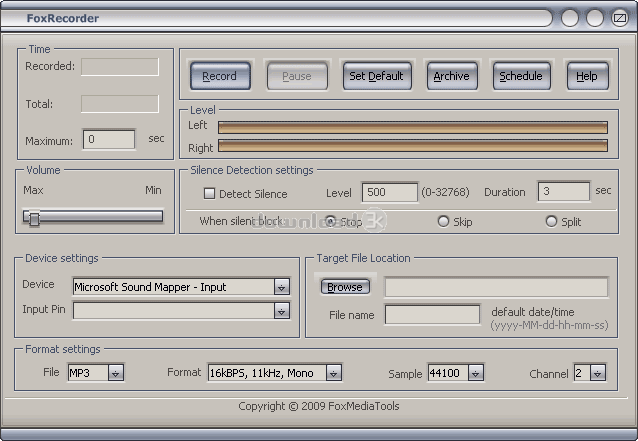
Fox Recorder is a complex sound tool, great for recording audio files. The program has the ability to transfer CDs, tapes, DVDs, TV, live shows, Internet radio, video games and any other sound source you can think of to your PC. It offers support for various popular formats such as MP3, WMA, OGG, VOX, AU, AIFF.Although Fox Recorder is very easy to operate, any uncertainty you might have will be surely clarified by pressing the Help button (upper right). You will be given useful information about the most typical tasks Fox Recorder is capable of like recording from microphone, videotape, mediaplayer, Internet, view recorded files, define hotkeys. When using Fox Recorder (Full Version) you will not be limited to any recording time (The Trial Version offers a 60 seconds time limit recording). You can name the recorded files yourself and save them in the directory you have selected.
After installing FoxRecorder you need to configure the settings such as: the sound source, the quality of your recording, and volume, and then just hit that Record button.
FoxRecorders look is unfussy and comprehensible and easily directs you to a number of audio operations including showing a waveform image of sound file, filtering, using various audio effects and an equalizer to adjust the sound quality of all recordings. One of the best features the program offers is a Scheduler which can be used as the handiest way to have any of your favorite Internet Radio shows saved on your computer.
Requirements: Windows
What's new in this version: General performance updates and small bugs fixed.
Antivirus information
Download3K has downloaded and tested FoxRecorder on 21 Oct 2018 with some of Today's best antivirus engines and you can find below, for your convenience, the scan results:
-
Avast:
Clean -
Avira:
Clean -
Kaspersky:
Infected -
McAfee:
Clean -
NOD32:
Clean

Popular downloads in MP3 Audio Video
-
 Realtek High Definition Audio Driver for 2000/XP/2003 32/64-bit R2.74
High definition audio driver from Realtek. -
 3GP Player 2013 1.4
Free 3GP Player for Pc -
 iTunes 12.13.7.1
Manage and play your music collection. -
 Windows Media Player 11
One of the best media player -
 Total Video Converter 3.72
Total Video Converter -
 TVexe TV HD 6.0
Watch free live TV on your PC now+ Radio -
 K-Lite Codec Pack Full 18.9.0
A collection of codecs and related tools. -
 Windows Media Player 9 Codecs Pack
The latest Windows Media codecs -
 VLC media player 3.0.21
A portable app of VLC media player. -
 KMPlayer 4.2.3.21 x86 / 2025.1.21.12 x64
A movie and audio player.
User rating
4.5/5 (14 votes)
Excellent
Your rating

-
OS
WinXP,WinVista,WinVista x64,Win7 x32,Win7 x64,WinOther,Windows 8 -
License
Freeware -
Price
$0 -
Updated
10/17/2018 -
Downloads
906 (1 last week) -
Size
4.08 MB -
MD5
07d038cf843c2616c6d7a51911b8f87d -
SHA1
cbe2349635cd690c0ba0a08c84b1a0b655766cb3 -
Developer
FoxMediaTools