VIWay 1.0
Developed by Valeri Vlassov
-
Windows, Pocket PC
-
setup file VIWay.zip (10.97 KB)
-
Demo
Select a download mirror:
- Developer Link 1 (non https VIWay.zip)
- Download3k US (VIWay.zip)
- Download3k EU (VIWay.zip)
MD5: a33b30758d82102119bac6d07747010d
All files are original. Download3K does not repack or modify downloads in any way. Check MD5 for confirmation.
Developer Description
"Small and simply GPS tracking program"
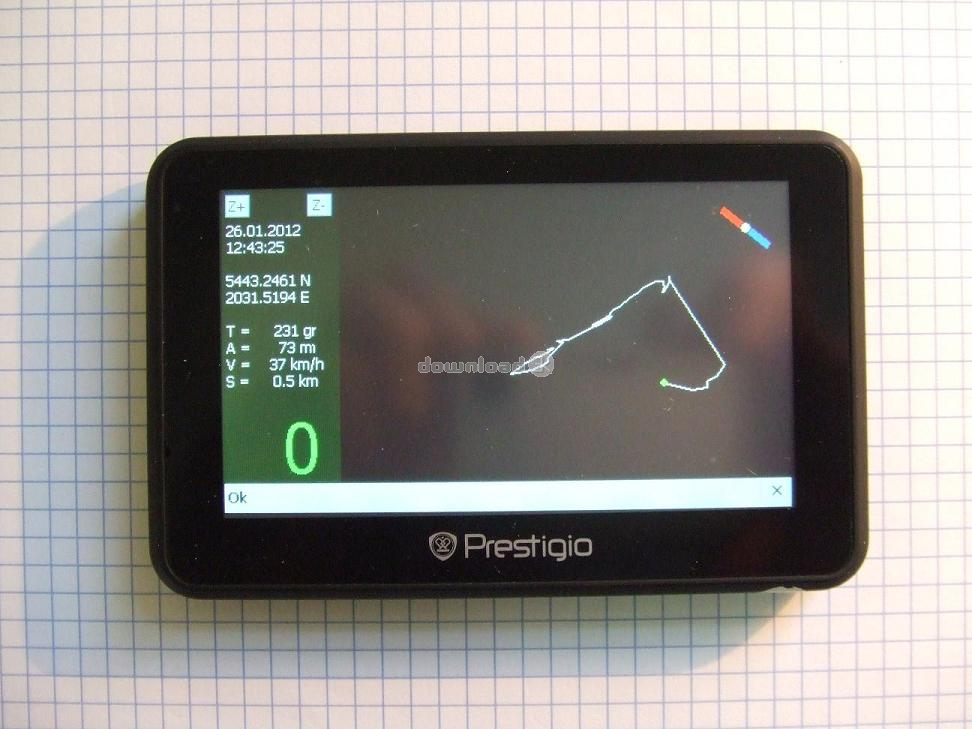
====== Options:- shows current GPS data (Date, Time, Lattitude, Longitude, Altitude, Direction, Speed, maximal
Track's speed, total Track's length);
- shows Compass while moving;
- shows current Track (Way) as a curve;
- writes Track's GPS data to the file "VIWay.txt";
- possibility Zoom drawn Track (+ or -);
- possibility drag drawn Track by your finger;
- works with Windows CE 5.0 and more;
- uses no maps;
- is small (about 30 KBytes exe file);
- uses about 1% of processor's resources only;
====== How to install VIWay:
- unzip the downloaded file "VIWay.zip";
- copy unzipped directory "VIWay" to any place of your Windows CE device;
- change ComPort number and BaudRate inside the file "VIWay.ini" according your GPS device;
====== How to use VIWay:
- run VIWay.exe;
- at the left Panel you will see current:
* Date (as dd.mm.yyyy);
* Time (as hh:mm:ss GMT);
* Lattitude (ggmm.mmmm N/S);
* Longitude (ggmm.mmmm W/E);
* T = Direction of moving (as grads, 0 grads is Nord);
* A = Altitude (as meters);
* V = Max Speed for all Track (as km/h);
* S = Total length of all Track (as km);
* 0 = Speed (as km/h);
- at the top of left Panel you will see two small buttons "Z+" and "Z-" (they make Zoom more or
less);
- at the right side you will see a Track window with a Compass and Track's curve.
- Compass shows the real Nord when you are moving;
- Track is started from the center of window as a small green circle and is moving according your
way. It is moving to the top of window when you are moving to the Nord, to the left when you are
moving to the West etc;
- you can drag the Track with your finger;
- GPS Data is being written to the log file "VIWay.txt" as:
* Time (as hh:mm:ss GMT);
* Lattitude (ggmm.mmmm N/S);
* Longitude (ggmm.mmmm W/E);
* Speed (as km/h);
* Direction of moving (as grads, 0 grads is Nord);
* Altitude (as meters);
Requirements: Windows CE 5.0
What's new in this version: No changes
Antivirus information
Download3K has downloaded and tested VIWay on 30 Aug 2023 with some of Today's best antivirus engines and you can find below, for your convenience, the scan results:
-
Avast:
Clean -
Avira:
Clean -
Kaspersky:
Clean -
McAfee:
Clean -
NOD32:
Clean

Popular downloads in Games
-
 Steam / Counter-Strike 1.6
Counter-Strike is a MOD for Half-Life. -
 PlayStation Portable (PSP) Firmware 6.61
PlayStation Portable System Software Updater. -
 Line Rider ZaDa 1.3
Line Rider - Desktop Edition. -
 Bus Driver 1.5a
Transport passengers around a realistic city! -
 Euro Truck Simulator 1.3b
Drive your truck across Europe! -
 Warcraft III: The Frozen Throne - Manual Patches Up to Patch 1.27(b)
Latest patch for Warcraft 3 The Frozen Throne -
 German Truck Simulator 1.32a
Drive your truck across Germany! - Grand Theft Auto 4 Patch 1.0.7.0
GTA 4 patch from Rockstar and Take Two. - Gaminator-multigame 1
Novomatic slot machine emulator -
 Cheat Engine 7.5 / 7.6 for Patreons
Cheat Engine will help you cheat in games
User rating
0/5 (0 votes)
Your rating

-
OS
Windows CE,Pocket PC,Windows Mobile 2003,Windows Mobile 2005 -
License
Demo -
Price
$5 -
Updated
8/30/2023 -
Downloads
66 (1 last week) -
Size
10.97 KB -
MD5
a33b30758d82102119bac6d07747010d -
SHA1
ed4b111dd2be778ce955aee9a095cdf69937a5ab -
Developer
Valeri Vlassov