Neoxen Visual Modus for SharePoint 10.38
Developed by Neoxen Systems
-
Windows, Wi
-
setup file setup_vmexpqx.exe (25.42 MB)
-
Commercial
Buy or select mirror:
- Buy $89.00
- Developer Link 1 (non https setup_vmexpqx.exe)
- Download3k US (setup_vmexpqx.exe)
- Download3k EU (setup_vmexpqx.exe)
MD5: 38e7040b47337332ec80686e8469f726
All files are original. Download3K does not repack or modify downloads in any way. Check MD5 for confirmation.
Developer Description
"Windows Desktop Explorer for SharePoint"
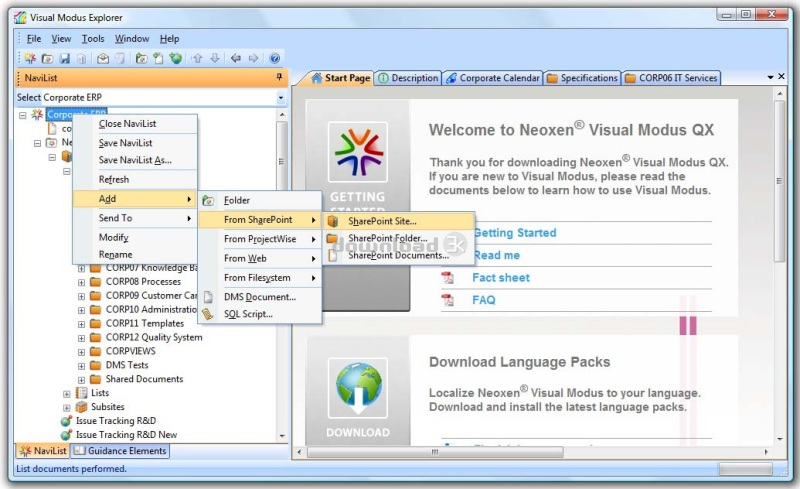
Visual Modus is a Windows Desktop Explorer for SharePoint. It allows you to manage and share documents, restructure folders and other resources stored in SharePoint. Drag and drop between SharePoint sites, to and from your email, local folders, ftp sites and network locations. Copy, move, add, and remove entire folder structures. Check-in, check-out, and send to other locations or email. Edit the SharePoint documents with any associated desktop application. Drag and drop emails and attachments directly to SharePoint or from SharePoint to your email. Manage document versions and properties. Create new documents from templates. Create your own logical navigation trees to SharePoint contents, even from multiple sites. Store these NaviLists as XML files and share them with your colleagues. Email NaviLists to others or send Visual Modus links to any SharePoint contents. Store your favorite locations into your Favorites. Create team, role or project based NaviLists and store them centrally in SharePoint. Define users to automatically load the specified NaviLists. Both Active Directory and forms based authentication are supported. Visual Modus supports HTTP, HTTPS, WebDAV, FTP and ODMA. Combine entire MOSS 2007, WSS 3.0 and SharePoint 2003 sites or only certain folders to logical hierarchies. Combine your FTP, intranet, file share, WebDAV and SharePoint sites. Link documents, instructions, descriptions, web links or folder contents together and store them as NaviLists. Visual Modus Explorer is installed in the client machine, no server installation is needed and no modification to the server or security settings is required. After setting up a server connection from Visual Modus Explorer, you can navigate the SharePoint server contents just as you would navigate folders in Windows Explorer. Navigate to a document or folder and right-click to get access to all related functionality. Open the SharePoint Organizer from the Tools menu to synchronize your offline files.Requirements: Pentium 4 compatible PC, 4GB RAM, 16MB hard-disk space for full installation
What's new in this version: Officially Certified for Windows 8, Windows 7, Office 2010, Windows Server 2008 R2 and Windows Server 2012.
Antivirus information
Download3K has downloaded and tested Neoxen Visual Modus for SharePoint on 17 Dec 2014 with some of Today's best antivirus engines and you can find below, for your convenience, the scan results:
-
Avast:
Clean -
Avira:
Clean -
Kaspersky:
Clean -
NOD32:
Clean

Popular downloads in Business & Finance
-
 Website Builder 9.0
This web site builder gives you everything y -
 PDF to Word | Solid Converter 10.1
Convert PDF to Word -
 Real Estate Price Calculator 3.0.1.5
Lands area length converter price calculator - Face Recognition System 2.0
Matlab source code for Face Recognition. -
 WPS Office Free 12.2.0.20326
Perfect free for creating & editing documents -
 XLS (Excel) to DBF Converter 3.16
Allows you to convert XLS files to DBF format -
 vCard Wizard 4.25
Transfer any Contacts. vCard vcf converter - Bill Maker 1.0
Bill, Invice, Inventory management -
 OEE 2
OEE 2
OEE calculator for MS Excel -
 Foxit Reader 10.0.0.35798
Protects Against Security.The Best PDF Reader
User rating
0/5 (0 votes)
Your rating

-
OS
Win7 x32,Win7 x64,Windows 8,WinServer,WinOther,Windows Server 2008r2,Windows Server 2012,WinVista,Wi -
License
Commercial -
Price
$89.00 Buy -
Updated
12/17/2014 -
Downloads
119 (3 last week) -
Size
25.42 MB -
MD5
38e7040b47337332ec80686e8469f726 -
SHA1
57c56188ddcbbd4c5b8455fcd4df7b4a2762e9d5 -
Developer
Neoxen Systems