XLCalendar 2.0.0.0
Developed by LJZsoft
-
Windows
-
setup file xlcal86.exe (482.42 KB)
-
Freeware
Select a download mirror:
- Developer Link 1 (non https xlcal86.exe)
- Developer Link 2 (non https xlcal64.exe)
- Download3k US (xlcal86.exe)
- Download3k EU (xlcal86.exe)
MD5: 91da3e7079146a4339832f1344fda96d
All files are original. Download3K does not repack or modify downloads in any way. Check MD5 for confirmation.
Developer Description
"Calendar generator for Microsoft Excel"
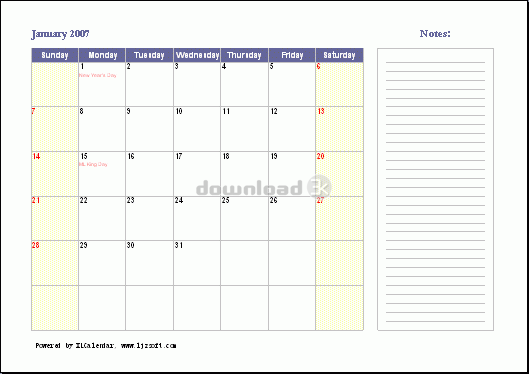
XLCalendar is a calendar generator for Microsoft Excel that outputs calendars in Microsoft Excel spreadsheet format. Using XLCalendar, you can easily make various kinds of perpetual calendars, and custom calendars in your own language, holidays and styles.Main features:
* Outputting calendars in Microsoft Excel spreadsheet format
Use Microsoft Excel to make calendars, and output calendars in Microsoft Excel spreadsheet format. It is easy to use, powerful and flexible.
* Supporting various kinds of calendars
Using XLCalendar, you can make various kinds of perpetual calendars. For example, monthly calendar on multiple worksheets, yearly calendar on one worksheet. The yearly calendar can be used with various month layouts, such as the 1x12 month layout, 2x6 month layout, 3x4 month layout and 4x3 month layout.
* Customizing your own calendars
You can make calendars in your own language, formats, layouts and styles, add your own holidays, birthdays, anniversaries, and other special events, and add the month name, weekday name that you like.
* Supporting various holidays and special events
XLCalendar supports numerous holidays, such as Christmas, Easter, Thanksgiving, and Labor Day. It supports various holidays for different countries, such as United States of America, United Kingdom, Canada and Australia. You can represent holidays using day (such as Feb 14) or weekday (such as the first Monday in Oct).
* Supporting week number
You can add week number in calendars. XLCalendar supports the USA week date system, ISO week date system and other week date system.
* Designing calendar directly in Microsoft Excel
XLCalendar is a template-based calendar tool. All formatting is done directly in Microsoft Excel. You can take full advantage of Microsoft Excel including cell formatting, conditional formatting, formulas, drawing and pictures, page setup, headers and footers, preview and printing, VBA, and more.
Requirements: MS Excel 2003 or later
What's new in this version: Rewrote this software with VB.Net.
Antivirus information
Download3K has downloaded and tested XLCalendar on 5 Sep 2016 with some of Today's best antivirus engines and you can find below, for your convenience, the scan results:
-
Avast:
Clean -
Avira:
Clean -
Kaspersky:
Clean -
NOD32:
Clean

Popular downloads in Business & Finance
-
 Website Builder 9.0
This web site builder gives you everything y -
 PDF to Word | Solid Converter 10.1
Convert PDF to Word -
 Real Estate Price Calculator 3.0.1.5
Lands area length converter price calculator - Face Recognition System 2.0
Matlab source code for Face Recognition. -
 WPS Office Free 12.2.0.20326
Perfect free for creating & editing documents -
 XLS (Excel) to DBF Converter 3.16
Allows you to convert XLS files to DBF format -
 vCard Wizard 4.25
Transfer any Contacts. vCard vcf converter - Bill Maker 1.0
Bill, Invice, Inventory management -
 OEE 2
OEE 2
OEE calculator for MS Excel -
 Foxit Reader 10.0.0.35798
Protects Against Security.The Best PDF Reader
User rating
5/5 (1 votes)
Excellent
Your rating

-
OS
Win7 x32,Win7 x64,WinServer,WinVista,WinVista x64,WinXP -
License
Freeware -
Price
$0 -
Updated
9/5/2016 -
Downloads
1094 (1 last week) -
Size
482.42 KB -
MD5
91da3e7079146a4339832f1344fda96d -
SHA1
24776df90cce2e8f5aeb9d3e508a6ff51675edcd -
Developer
LJZsoft