Ribbon Helper for Office 2.1
Developed by Addintools
-
Windows,
-
setup file RibbonHelper.exe (8.92 MB)
-
Shareware
Buy or select mirror:
- Buy $15
- Developer Link 1 (non https RibbonHelper.exe)
- Download3k US (RibbonHelper.exe)
- Download3k EU (RibbonHelper.exe)
MD5: ff860f4329ffa73e1d6dbe4437ea6202
All files are original. Download3K does not repack or modify downloads in any way. Check MD5 for confirmation.
Developer Description
"Ribbon Helper for Office 2007 and 2010"
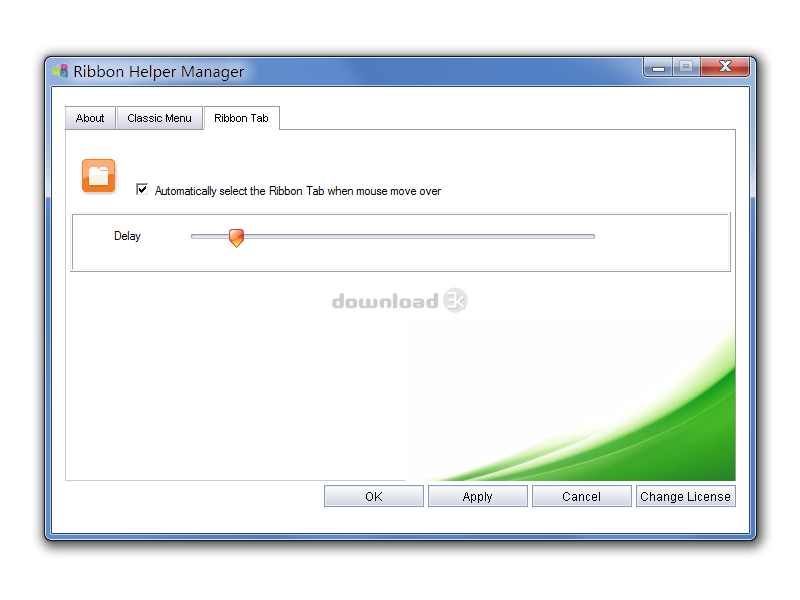
Ribbon Helper helps you to automatically Select Ribbon Tabs and Drop down Menus without Clicks.No click, just move mouse over tabs to bring the Ribbon Tabs to front. No click, just move mouse over menus to drop down the Classic Menus. Save your mouse click finger now!
Do you have a feeling that your forefinger aches because you take too many clicks while using computer? Do you need any keyboard shortcuts to in place of clicks to relieve this pain? You'll save endless clicks with your mouse when you are using Microsoft Office 2007 or 2010 with this handy Office add-in - Ribbon Helper for Office. With Ribbon Helper, to switch among Ribbon Tabs is never been so easy.
There are over half a million users have chosen our software: Classic Menu for Office 2007 and 2010 to bring back the Office 2003 style menus in Office 2007 and 2010. If you are one of those users, you can also use the Ribbon Helper for Office to drop down the Classic Menu items without any clicks!
Even if the ribbon is minimized, the ribbon tabs can still be automatically activated and expanded.
Works with Word, Excel, PowerPoint, Outlook, Publisher, Access, InfoPath, and Visio (except OneNote and Project).
Ribbon Helper is fully compatible with:
Microsoft Office 2007 or Microsoft Office 2010 (32-bit and 64-bit).
Windows XP 32/64, Vista 32/64, Windows 7 32/64, Windows Server 2003 32/64 and Server 2008. Citrix System and Windows Terminal (Remote Desktop) Server.
You can configure the settings, such as the following options:
(1) Enable/disable automatically activating ribbon tabs.
(2) Enable/disable automatically expanding classic menus.
(3) Adjust the speed of activating ribbon tabs.
(4) Adjust the speed of expanding classic menus.
(5) Change mode of expanding classic menus.
Requirements: Microsoft Office 2007 or 2010 installed
What's new in this version: 1.Support opening the drop down list of buttons in Office 2007/2010 tabs; 2.Revise the description; 3.Modify the manger and register dialog box, fix the close button bug.
Antivirus information
Download3K has downloaded and tested Ribbon Helper for Office on 31 May 2012 with some of Today's best antivirus engines and you can find below, for your convenience, the scan results:
-
Avira:
Clean -
Kaspersky:
Clean -
NOD32:
Clean

Popular downloads in Business & Finance
-
 Website Builder 9.0
This web site builder gives you everything y -
 PDF to Word | Solid Converter 10.1
Convert PDF to Word -
 Real Estate Price Calculator 3.0.1.5
Lands area length converter price calculator - Face Recognition System 2.0
Matlab source code for Face Recognition. -
 WPS Office Free 12.2.0.20326
Perfect free for creating & editing documents -
 XLS (Excel) to DBF Converter 3.16
Allows you to convert XLS files to DBF format -
 vCard Wizard 4.25
Transfer any Contacts. vCard vcf converter - Bill Maker 1.0
Bill, Invice, Inventory management -
 OEE 2
OEE 2
OEE calculator for MS Excel -
 Foxit Reader 10.0.0.35798
Protects Against Security.The Best PDF Reader
User rating
0/5 (0 votes)
Your rating

-
OS
WinXP,WinVista,WinVista x64,Win7 x32,Win7 x64,WinOther,Windows2003,WinServer,Windows Vista Ultimate, -
License
Shareware -
Price
$15 Buy -
Updated
10/1/2011 -
Downloads
56 (6 last week) -
Size
8.92 MB -
MD5
ff860f4329ffa73e1d6dbe4437ea6202 -
SHA1
abf9b5e781d1fa055fa796981d18ec4546a4e9e6 -
Developer
Addintools