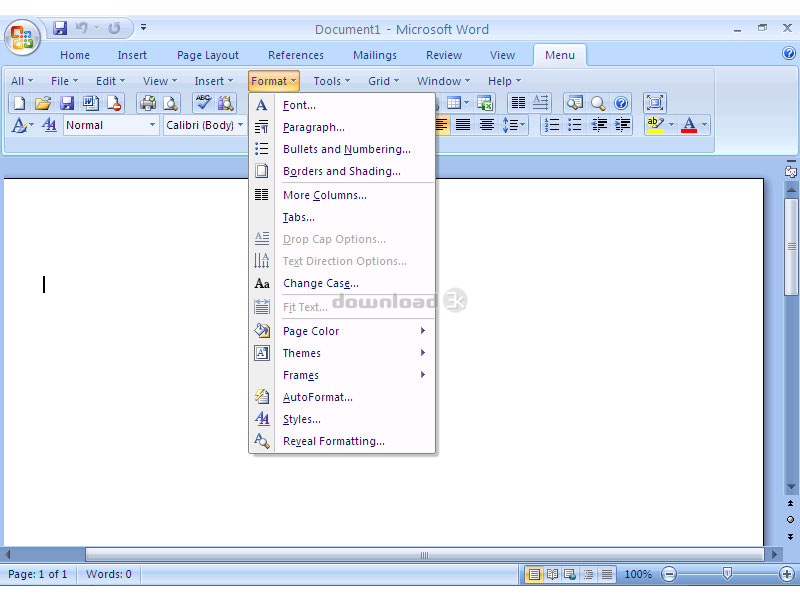
Classic Menu for Word 2007 5.25
Developed by Addintools
-
Windows
-
setup file Setup_WordMenu.exe (4.70 MB)
-
Shareware
Buy or select mirror:
- Buy $15.99
- Developer Link 1 (Setup_WordMenu.exe)
- Download3k US (Setup_WordMenu.exe)
- Download3k EU (Setup_WordMenu.exe)
MD5: 5700ce5320292f62bc5c7cc9bea4457f
All files are original. Download3K does not repack or modify downloads in any way. Check MD5 for confirmation.
Developer Description
"Show Classic Menus Again in Word 2007"
Bring back the classic menus and toolbars of Word 2003 to Microsoft Word 2007. You can use Word 2007 immediately without any training or tutorials if you used Word 2003 before. The software allows you to work with Word 2007 as if it were Word 2003.All the new features in Microsoft Word 2007 have been added into the Main Menu, Standard Toolbar and Formatting Toolbar.
User can browse the whole menus with keyboard shortcuts (insert Q into the original shortcuts of Office 2003. For example: press Alt + T to open the "Tools" menu in Word 2003, you just need to press Alt, Q, T to open the "Tools" menu in Word 2007).
Supports all languages that are supported by Microsoft Word 2007 including: English, French, German, Italian, Spanish, Portuguese, Japanese, Chinese, and more.
Add the menus and toolbars to the Quick Access Toolbar, and you can use Word without the ribbon.
Easy to enable or disable the menus and toolbars.
Easy to install and uninstall.
Quickly find and execute the command that you need.
The Menus tab can be shown on the left of Home tab, or shown as the last tab.
Requirements: Microsoft Word or Office 2007 installed
What's new in this version: User can browse the whole menus with keyboard shortcuts (insert Q into the original shortcuts of Office 2003. For example: press Alt + T to open the "Tools" menu in Word 2003, you just need to press Alt, Q, T to open the "Tools" menu in Word 2007)
Antivirus information
Download3K has downloaded and tested Classic Menu for Word 2007 on 14 Jul 2018 with some of Today's best antivirus engines and you can find below, for your convenience, the scan results:
-
Avast:
Clean -
Avira:
Clean -
Kaspersky:
Clean -
McAfee:
Clean -
NOD32:
Clean

Popular downloads in Business & Finance
-
 Website Builder 9.0
This web site builder gives you everything y -
 PDF to Word | Solid Converter 10.1
Convert PDF to Word -
 Real Estate Price Calculator 3.0.1.5
Lands area length converter price calculator - Face Recognition System 2.0
Matlab source code for Face Recognition. -
 WPS Office Free 12.2.0.20326
Perfect free for creating & editing documents -
 XLS (Excel) to DBF Converter 3.16
Allows you to convert XLS files to DBF format -
 vCard Wizard 4.25
Transfer any Contacts. vCard vcf converter - Bill Maker 1.0
Bill, Invice, Inventory management -
 OEE 2
OEE 2
OEE calculator for MS Excel -
 Foxit Reader 10.0.0.35798
Protects Against Security.The Best PDF Reader
User rating
0/5 (0 votes)
Your rating

-
OS
WinXP,WinVista,WinVista x64,Win7 x32,Win7 x64,WinOther,WinServer -
License
Shareware -
Price
$15.99 Buy -
Updated
7/14/2018 -
Downloads
656 (2 last week) -
Size
4.70 MB -
MD5
5700ce5320292f62bc5c7cc9bea4457f -
SHA1
3807a242bd6dd911f6ad0e79bfcdd3748883b841 -
Developer
Addintools