Classic Menu Helper 2.1
Developed by Addintools
-
Windows,
-
setup file ClassicMenuHelper.exe (8.85 MB)
-
Freeware
Select a download mirror:
- Developer Link 1 (non https ClassicMenuHelper.exe)
- Download3k US (ClassicMenuHelper.exe)
- Download3k EU (ClassicMenuHelper.exe)
MD5: 41cb16b9e8dbcd96829be1aa6814e563
All files are original. Download3K does not repack or modify downloads in any way. Check MD5 for confirmation.
Developer Description
"Classic Menu Helper is free"
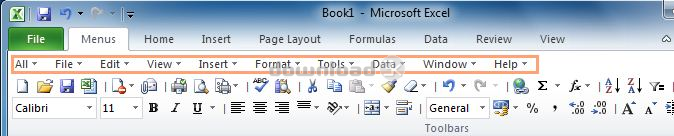
Classic Menu Helper helps you to automatically drop down menus and buttons in toolbar without clicks.Classic Menu Helper is designed for Classic Menu for Office specially, and the Classic Menu Helper is fully free for all users (personal and commercial) of Classic Menu for Office.
No click, just move mouse over menus to drop down old menus, and over commands on toolbars to show more command options, as well as galleries and split buttons
You'll save endless clicks with your mouse when you are using Classic Menu for Office in Microsoft Office 2007 or 2010. With Classic Menu Helper, it is easy to switch among menus and commands on Toolbar.
Addintools provides Classic Menu for Office to bring back old menus and toolbars in Microsoft Office 2007 or 2010 Ribbon. At present, Addintools released the Classic Menu Helper, which is designed for our users of Classic Menu for Office specially, just move mouse over the menus and open and switch menus from one to the other easily without boring repeated clicking. No matter you will use classic menu helper personally or for commercial use, Classic Menu Ribbon is fully free - that's the gift we prepared for our Classic Menu for Office users.
Classic Menu Helper is fully compatible with:
Microsoft Office 2007 or Microsoft Office 2010 (32-bit and 64-bit).
Windows XP 32/64, Vista 32/64, Windows 7 32/64, Windows Server 2003 32/64 and Server 2008. Citrix System and Windows Terminal (Remote Desktop) Server.
You can configure the settings, such as the following options:
(1) Enable/disable automatically expanding classic menus.
(2) Adjust the speed of expanding classic menus.
(3) Change mode of expanding classic menus.
Requirements: Microsoft Office 2007 or 2010 and Classic Menu for Helper installed
What's new in this version: 1.Support opening the drop down list of buttons in Office 2007/2010 tabs; 2.Revise the description; 3.Modify the manger and register dialog box, fix the close button bug. 4.Request to install Classic Menu for Office during installing Classic Menu Helper.
Antivirus information
Download3K has downloaded and tested Classic Menu Helper on 6 Jun 2012 with some of Today's best antivirus engines and you can find below, for your convenience, the scan results:
-
Avira:
Clean -
Kaspersky:
Clean -
NOD32:
Clean

Popular downloads in Business & Finance
-
 Website Builder 9.0
This web site builder gives you everything y -
 PDF to Word | Solid Converter 10.1
Convert PDF to Word -
 Real Estate Price Calculator 3.0.1.5
Lands area length converter price calculator - Face Recognition System 2.0
Matlab source code for Face Recognition. -
 WPS Office Free 12.2.0.20326
Perfect free for creating & editing documents -
 XLS (Excel) to DBF Converter 3.16
Allows you to convert XLS files to DBF format -
 vCard Wizard 4.25
Transfer any Contacts. vCard vcf converter - Bill Maker 1.0
Bill, Invice, Inventory management -
 OEE 2
OEE 2
OEE calculator for MS Excel -
 Foxit Reader 10.0.0.35798
Protects Against Security.The Best PDF Reader
User rating
0/5 (0 votes)
Your rating

-
OS
WinXP,WinVista,WinVista x64,Win7 x32,Win7 x64,WinOther,Windows2003,WinServer,Windows Vista Ultimate, -
License
Freeware -
Price
$0 -
Updated
9/29/2011 -
Downloads
52 (8 last week) -
Size
8.85 MB -
MD5
41cb16b9e8dbcd96829be1aa6814e563 -
SHA1
ac7e6f67e3f635355dddd19629d72787081f0f70 -
Developer
Addintools