Download

Salesforce Contact Capture Tool - AddressGrabber for Web CRM 5.6
Developed by eGrabber Inc
-
Windows
-
setup file agWebCRM_012908_Setup.exe (11.84 MB)
-
Shareware
Select a download mirror:
- Developer Link 1 (non https)
- Developer Link 2 (non https)
- Developer Link 3 (non https)
- Developer Link 4 (non https)
- Download3k US (ver 5.6, agWebCRM_012908_Setup.exe)
- Download3k EU (ver 5.6, agWebCRM_012908_Setup.exe)
MD5: ef4a5ba53721fa129537bc2ebb09b4fa
All files are original. Download3K does not repack or modify downloads in any way. Check MD5 for confirmation.
Developer Description
"Download Contact Capture for Salesforce"
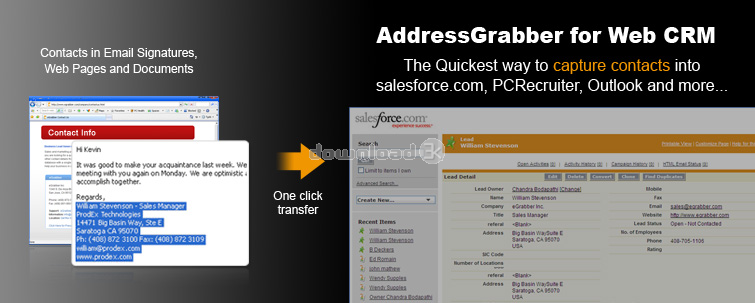
How does AddressGrabber for Web CRM work?AddressGrabber is a PC desktop application. Once installed, AddressGrabber appears as a floating tool bar on your desktop. To enter a contact, follow these two simple steps:
1. Highlight Contact: Highlight contact, as though you were going to copy it.
2. Click Icon: Click on the application icon on the AddressGrabber toolbar.
View transferred contact: The contact details get transferred to your database.
Works with: Salesforce.com, PCRecruiter, and more…
Features of using AddressGrabber for Web CRM:
1. AddressGrabber is fast, accurate and saves time: AddressGrabber intelligently figures out critical contact details like First Name, Last Name, Title, Company, Street, City, State, Zip, Phone, Fax, Email address & Web site address and automatically enters them into your database. It eliminates the need to re-type or cut-n-paste data.
2. AddressGrabber Flags Duplicates: AddressGrabber alerts when a duplicate record is being entered into your online application. You can add it as a new record, update the record or skip transfer. AddressGrabber helps you to maintain a clean database.
Benefits of using AddressGrabber for Web CRM:
1. AddressGrabber Saves Time - AddressGrabber saves time by eliminating the need to cut and paste contact information field by field. One click, enters all fields of the contact into your online application such as salesforce.com or PCRecruiter in less than 10 seconds.
2. AddressGrabber Eliminates Typos - Anytime manual data-entry is involved, typing mistakes are bound to occur. AddressGrabber enables not only fast, but also very accurate data entry. It eliminates typos, character reversals etc.
Download the free trial: http://www.egrabber.com/TU4233E97
.
Requirements: MS Windows XP(with Service Pack 2 in/Vista(32-bit),512 MB RAM
Antivirus information
Download3K has downloaded and tested Salesforce Contact Capture Tool - AddressGrabber for Web CRM on 21 Jun 2012 with some of Today's best antivirus engines and you can find below, for your convenience, the scan results:
-
Avira:
Clean -
Kaspersky:
Clean -
NOD32:
Clean

Popular downloads in Business & Finance
-
 Website Builder 9.0
This web site builder gives you everything y -
 PDF to Word | Solid Converter 10.1
Convert PDF to Word -
 Real Estate Price Calculator 3.0.1.5
Lands area length converter price calculator - Face Recognition System 2.0
Matlab source code for Face Recognition. -
 WPS Office Free 12.2.0.20326
Perfect free for creating & editing documents -
 XLS (Excel) to DBF Converter 3.16
Allows you to convert XLS files to DBF format -
 vCard Wizard 4.25
Transfer any Contacts. vCard vcf converter - Bill Maker 1.0
Bill, Invice, Inventory management -
 OEE 2
OEE 2
OEE calculator for MS Excel -
 Foxit Reader 10.0.0.35798
Protects Against Security.The Best PDF Reader
User rating
0/5 (0 votes)
Your rating

-
OS
Windows Vista,WinXP -
License
Shareware -
Price
$$99.95/year -
Updated
9/16/2020 -
Downloads
159 (1 last week) -
Size
11.84 MB -
MD5
ef4a5ba53721fa129537bc2ebb09b4fa -
SHA1
c103e03e9a3c862fee6e35463a4cdb91996db46f -
Developer
eGrabber Inc