DTM DB Event 1.05.02
Developed by DTM soft
-
Windows
-
setup file eve_d.exe (2.93 MB)
-
Demo
Buy or select mirror:
- Buy $129
- Developer Link 1 (non https eve_d.exe)
- Developer Link 2 (non https eve_d.exe)
- Download3k US (eve_d.exe)
- Download3k EU (eve_d.exe)
MD5: f098c8992d56545abeb847f947a55f43
All files are original. Download3K does not repack or modify downloads in any way. Check MD5 for confirmation.
Developer Description
"Database state monitoring and management tool"
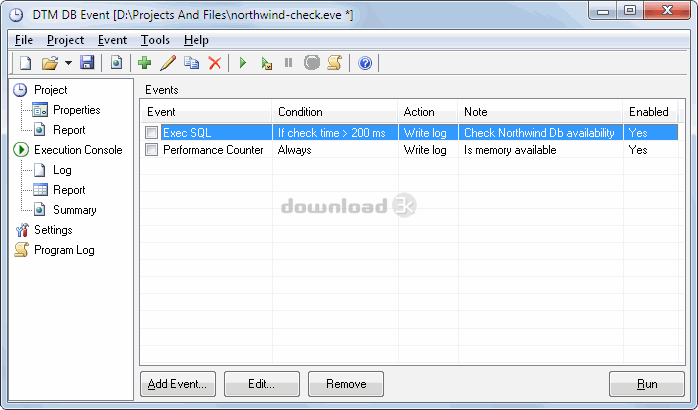
DTM DB Event is a database monitoring and management tool. This utility allows the user to define a few situations (events). For each event the user can define what the program should do if the event is occur. The program helps the database administrator to perform continuously database status monitoring. Also, if critical events are occurring, the program can make required actions automatically.For example, if database server is not available, the tool will execute an external program for notification message (alert) sending. It helps company to protect database or minimize downtime. The program will check conditions by the user-defined schedule and execute related action.
Any SQL statement for any user defined database connection can be used for event definition. The user can use a few types of conditions like "was executed successful", "execution error" or define unconditional event. Unconditional event is an event action of that will be executed in any case.
There are three types of events: infinitive, run once or predefined number of checks. The infinitive event will be checked until the program work. The interval between checks for event can be defined by number of seconds, minutes or hours. Also, the user can define delay before the first check after start the program for each event individually.
There are actions that the program can do when event occurs:
1) Do nothing. The user can select it if required action already defined in the event. For example, the program should execute "Compact" operation for defined database for each 24 hours unconditionally.
2) Execute user defines SQL script.
3) Execute external program or batch file.
4) Write record to program LOG file.
DTM DB Event is a true Win32 application, supports Windows 2000/XP, Server 2003/2008 and Vista/7.
Requirements: ODBC, IDAPI, OLE DB or Oracle Call Interface
What's new in this version: Local or remote Performance counter value as event definition. Bulk event change options. New navigation panel. New five built in report and log viewers. New event type: check for file or directory access. $VALUE$ macro support for SQL action.
Antivirus information
Download3K has downloaded and tested DTM DB Event on 1 Dec 2022 with some of Today's best antivirus engines and you can find below, for your convenience, the scan results:
-
Avast:
Clean -
Avira:
Clean -
Kaspersky:
Clean -
McAfee:
Clean -
NOD32:
Clean

Popular downloads in Business & Finance
-
 Website Builder 9.0
This web site builder gives you everything y -
 PDF to Word | Solid Converter 10.1
Convert PDF to Word -
 Real Estate Price Calculator 3.0.1.5
Lands area length converter price calculator - Face Recognition System 2.0
Matlab source code for Face Recognition. -
 WPS Office Free 12.2.0.20326
Perfect free for creating & editing documents -
 XLS (Excel) to DBF Converter 3.16
Allows you to convert XLS files to DBF format -
 vCard Wizard 4.25
Transfer any Contacts. vCard vcf converter - Bill Maker 1.0
Bill, Invice, Inventory management -
 OEE 2
OEE 2
OEE calculator for MS Excel -
 Foxit Reader 10.0.0.35798
Protects Against Security.The Best PDF Reader
User rating
0/5 (0 votes)
Your rating