WizKey 1.5.0.5
- Buy $24.95
- Developer Link 1 (non https wizkey_1_5_0_5_setup.exe)
- Download3k US (ver 1.5.0.5, wizkey_1_5_0_5_setup.exe)
- Download3k EU (ver 1.5.0.5, wizkey_1_5_0_5_setup.exe)
MD5: a322423c5bf42a0a8871c0de47325a31
All files are original. Download3K does not repack or modify downloads in any way. Check MD5 for confirmation.
Review & Alternatives
"Type accents and special characters easily."
Overview
WizKey is a keyboard enhancement utility that makes it much easier to type special or accented foreign characters on the keyboard. The program can display entire character sets from different keyboard layouts so that the user can access special and accented characters more easily than hunting around for the right keyboard combination to bring up just the necessary character on to the screen. Access special and accented characters available in the font used by the current application in use.
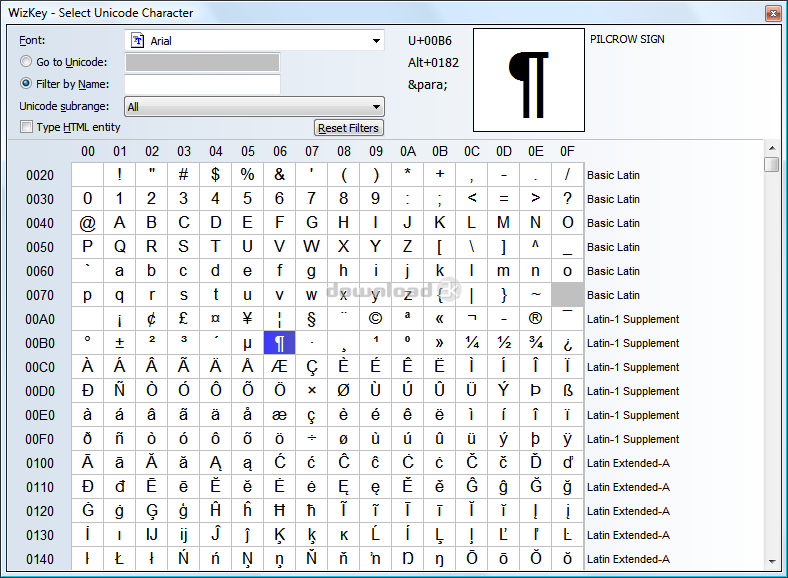
Search for Unicode characters by name. Type in any Unicode characters that are supported by a currently accessed application using the Unicode Character browser. Type in HTML entity codes using the Unicode Character browser. Forget difficult to remember Alt-key combinations and use the Unicode Character browser instead.
Installation
The installation proceeds normally. There is a Quick start guide that is offered at the end of the installation. A pop up window displays once the installation is complete which shows some of its own shortcuts keys for the WizKey application. These can be re-displayed each time the application is loaded up. It would have been nice to have these offered as a PDF or graphical image for easy access later.
Works on Windows 2000, XP, Vista and Windows 7/8
The software did not install any malicious software.
Interface
The interface will appear when the Ctrl + Ctrl button is press twice in quick succession. A long window will overlay the current application which will display the special and accented characters available with the font used in that current application. The mouse is then used to move down the list to select the character that is most useful. Often there are several versions of a character and a sub menu will pop out when hovered over to select from additional choices. To get capital letters for the selected character, hold down the CAPS LOCK button when selecting the character choice.
Pros
- Access special and accented characters in fonts used in any major application
- Pop up hovering window which the user can select any special and accented characters that are available
- See a larger list of Unicode characters
- Select lower-case or upper-case characters
- View a Unicode Browser to access a full list of available special and accented characters
- 30 day trial
Cons
- A little tricky to get used to the interface initially as it works kind of counter-intuitively
Conclusion
WizKey is a useful application for anyone who uses written language that includes special and accented characters.

What's new in this version: Fixed startup problems on Windows Vista/7 when running 'as administrator'.
Antivirus information
-
Avira:
Clean -
Kaspersky:
Clean -
NOD32:
Clean

Popular downloads in System Utilities
-
 Realtek AC'97 Drivers A4.06
Realtek AC 97 sound driver. -
 Windows 7 Service Pack 1 (SP1) 32-bit & 64-bit (KB976932)
The first service pack for Windows 7. -
 Realtek High Definition Audio Driver for Vista, Win7, Win8, Win8.1, Win10 32-bit R2.82
High definition audio driver from Realtek. -
 .NET Framework 2.0
The programming model of the .NET -
 Driver Cleaner Professional 1.5
Improved version of Driver Cleaner -
 RockXP 4.0
Allows you to change your XP product key -
 Realtek AC'97 Drivers for Vista/Win7 6305
Multi-channel audio CODEC designed for PC. -
 DAEMON Tools Lite 12.0.0.2126
The FREE Virtual CD/DVD-ROM-EMULATOR. -
 SIW 14.1.0417
SIW - System Information for Windows -
 AutoCorect 4.1.5
Diacritice la comanda, punctuatie automata.


-
OS
WinNT 4.x,Windows2000,WinXP,Windows2003,Windows Vista Starter,Windows Vista Home Basic,Windows Vista -
License
Shareware -
Price
$24.95 Buy -
Updated
12/16/2020 -
Downloads
269 (5 last week) -
Size
1.82 MB -
MD5
a322423c5bf42a0a8871c0de47325a31 -
SHA1
4aae5bf67be2a67f9975783e4d2abf6bb9a5c646 -
Developer
Antibody Software