Run As Service 4.0
Developed by Eltima Software
-
Windows
-
setup file application_service.exe (6.87 MB)
-
Shareware
Buy or select mirror:
- Buy $79.95
- Developer Link 1 (non https application_service.exe)
- Download3k US (application_service.exe)
- Download3k EU (application_service.exe)
MD5: 2574e2195594f3c8b60529c09d13d0c3
All files are original. Download3K does not repack or modify downloads in any way. Check MD5 for confirmation.
Developer Description
"Run application as Windows service"
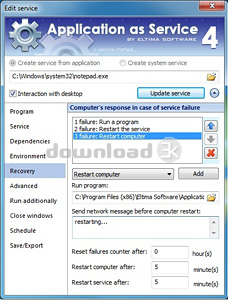
Run as Service by Eltima Software is a powerful utility which is aimed to let you launch any program as Windows service.With Run as Service you can run any application as service at system boot not even starting a user session. Run as Service allows you to create, view, edit and manage services on local or remote computers. Moreover, it is possible to handle multiple remote sides simultaneously without the necessity to install Run as Service on remote computer.
Run as Service allows running applications as services interactively (visible to users) or silently. Both, interactively and silently run services can be launched under user accounts. Users can also choose the user session (including RDP) in which interactive service should be started.
Run as Service allows you to schedule the launch of program as service on a specific date or time. All you need to do is set scheduler settings only once and the rest will be done by Run as Service right on time.
Run as Service allows creating services using GUI, command line or XML configuration file.
In case of the crash or power cut your program can be restarted automatically if you have Run as service, thus increasing the uptime of this program.
Run as Service has a very intuitive and friendly interface which is comprehensive even for the beginners. With Run as Service launching any application as Windows service is a child's play!
Requirements: Win7, WinXP, WinVista, Win2003, Win2000
What's new in this version: Added: choice of user session in which interactive service should be started; start interactive services under vista/7/2008; interactive services can be started under user account; service creation and management over the network: Application as Service is not required on the remote PC
Antivirus information
Download3K has downloaded and tested Run As Service on 28 Jan 2014 with some of Today's best antivirus engines and you can find below, for your convenience, the scan results:
-
Avast:
Clean -
Avira:
Clean -
Kaspersky:
Clean -
NOD32:
Clean

Popular downloads in System Utilities
-
 Realtek AC'97 Drivers A4.06
Realtek AC 97 sound driver. -
 Windows 7 Service Pack 1 (SP1) 32-bit & 64-bit (KB976932)
The first service pack for Windows 7. -
 Realtek High Definition Audio Driver for Vista, Win7, Win8, Win8.1, Win10 32-bit R2.82
High definition audio driver from Realtek. -
 .NET Framework 2.0
The programming model of the .NET -
 Driver Cleaner Professional 1.5
Improved version of Driver Cleaner -
 RockXP 4.0
Allows you to change your XP product key -
 Realtek AC'97 Drivers for Vista/Win7 6305
Multi-channel audio CODEC designed for PC. -
 DAEMON Tools Lite 12.3.0.2297
The FREE Virtual CD/DVD-ROM-EMULATOR. -
 AutoCorect 4.1.5
Diacritice la comanda, punctuatie automata. -
 SIW 16.08.0603
SIW - System Information for Windows
User rating
3.5/5 (2 votes)
Good
Your rating

-
OS
WinXP,WinVista,Win7 x32,Win7 x64,Win2000,Windows2003 -
License
Shareware -
Price
$79.95 Buy -
Updated
1/28/2014 -
Downloads
77 (1 last week) -
Size
6.87 MB -
MD5
2574e2195594f3c8b60529c09d13d0c3 -
SHA1
ff45e85583088595b6cdd47020d7b3cafc59c5ab -
Developer
Eltima Software