Auslogics Task Manager 2.2.1
- Developer Link 1 (non https task-manager-setup.exe)
- Developer Link 2 (non https task-manager-setup.exe)
- Download3k US (task-manager-setup.exe)
- Download3k EU (task-manager-setup.exe)
MD5: 3a11cde53e8bf409e17b8472c22a9686
All files are original. Download3K does not repack or modify downloads in any way. Check MD5 for confirmation.
Quick Review
"Find rogue programs slowing down your PC."
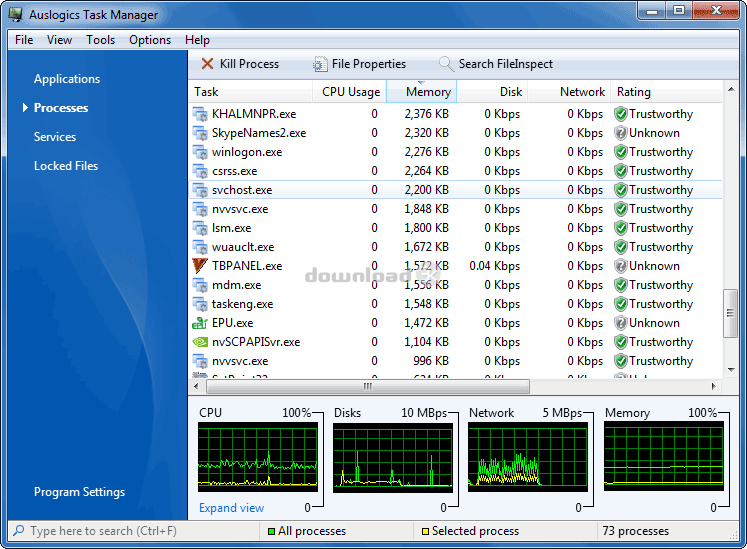
Auslogics Task Manager is a task manager for Windows which can show you the running applications, processes, services and locked files. Each item is shown with relevant data. In case of running processes, these are listed along with their respective CPU usage, memory used, disk data transfer related to it, network data transfer related to it and whether the item is believed to be trustworthy. At the bottom of the window are four running graphs and a readout, to indicate current CPU, Disk, Network and Memory usage. The application is well laid out, however it doesn't seem to offer much that the existing Windows Task Manager doesn't already provide adequately enough (with the exception of the locked files list).
Auslogics Task Manager Key Features:
- View running applications, processes, services and locked files
- Kill applications or processes that are taking up too many resources
- Freeware
Auslogics Task Manager is an alternative task manager if the Windows-based one is not to your liking.
Requirements: Pentium Proccessor, 256 MB RAM, 25 MB HDD
What's new in this version: - improved the "Run Program... " drop-down list. Now the list displays previously entered paths and available paths - improved the application kill warning. Also improved design and added an option to display the list of locked files - added a PID column - improved stability - fixed bugs
Antivirus information
-
Avast:
Clean -
Avira:
Clean -
Kaspersky:
Clean -
NOD32:
Clean

Popular downloads in System Utilities
-
 Realtek AC'97 Drivers A4.06
Realtek AC 97 sound driver. -
 Windows 7 Service Pack 1 (SP1) 32-bit & 64-bit (KB976932)
The first service pack for Windows 7. -
 Realtek High Definition Audio Driver for Vista, Win7, Win8, Win8.1, Win10 32-bit R2.82
High definition audio driver from Realtek. -
 .NET Framework 2.0
The programming model of the .NET -
 Driver Cleaner Professional 1.5
Improved version of Driver Cleaner -
 RockXP 4.0
Allows you to change your XP product key -
 Realtek AC'97 Drivers for Vista/Win7 6305
Multi-channel audio CODEC designed for PC. -
 DAEMON Tools Lite 12.3.0.2297
The FREE Virtual CD/DVD-ROM-EMULATOR. -
 AutoCorect 4.1.5
Diacritice la comanda, punctuatie automata. -
 SIW 16.08.0603
SIW - System Information for Windows

-
OS
WinXP,WinVista,Win7 x32,Win7 x64,Windows Vista Ultimate,Windows Vista Starter,Windows Vista Home Bas -
License
Freeware -
Price
$0.00 -
Updated
11/14/2013 -
Downloads
674 (2 last week) -
Size
4.98 MB -
MD5
3a11cde53e8bf409e17b8472c22a9686 -
SHA1
c49d8ef1e8d4578b26c2456f373631b6737797fc -
Developer
Auslogics Software Pty Ltd