WindowSpace 2.6.1
Developed by NTWind Software
-
Windows
-
setup file WindowSpace_2.6.3-setup.exe (0.54 MB)
-
Shareware
Buy or select mirror:
- Buy $24.95
- Developer Link 1 (non https WindowSpace-setup.exe)
- Download3k US (WindowSpace_2.6.3-setup.exe)
- Download3k EU (WindowSpace_2.6.3-setup.exe)
MD5: 03826f12cb52a25958ff51109951158e
All files are original. Download3K does not repack or modify downloads in any way. Check MD5 for confirmation.
Developer Description
"Make the most of your desktop workspace"
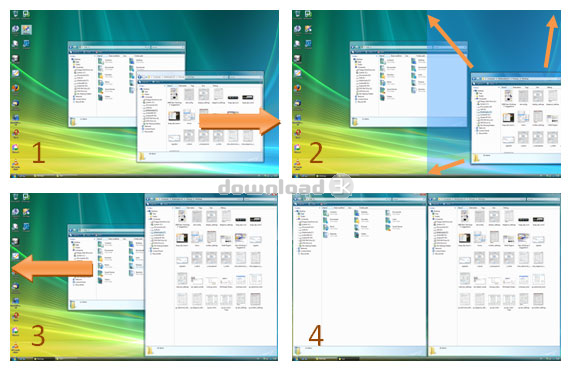
WindowSpace is a desktop enhancement utility that allows you to manipulate windows in many new ways. Now, you can snap windows to the screen edges and other windows, move and resize them with keyboard shortcuts, maximize vertically or horizontally, pin a window on top of the others, hide from view, minimize to tray, and do other useful things. WindowSpace makes it a true delight for the computer user to manage multiple windows on a big screen, widescreen, or even on a multi-monitor system.Snapping is a great way to avoid window overlapping that comes as a result of multitasking. Too many open windows make the desktop messy as they partly cover or completely block each other. It affects your performance as very soon you'll find yourself hunting for windows, rather than doing the job. This is where WindowSpace can extend a helping hand. Just enable its snapping feature, and it'll help you to avoid overlapping. Snap windows to each other or to the screen neatly, edge to edge, and stop playing hide-and-seek with them!
If you love your keyboard more than the mouse, you'll be pleased to be able to move and resize windows using a set of keyboard shortcuts. Now, you do not have to reach for the mouse or sweep the finger across the touchpad to move a window on the screen, make it bigger or smaller. With WindowSpace, you can also quickly maximize a window vertically or horizontally, rather than open it full-screen. This feature comes in handy if you want to see the window content with the minimal amount of white space. Also looking at two vertically opened pages sitting next to each other makes things a lot easier to compare, or move content between them.
WindowSpace gives you even more opportunities to manage windows with the keyboard. In just one press of the hotkey, you can tile all desktop windows vertically or horizontally, cascade, or close them. Other useful features, "Minimize To Tray" and "Hide Window" will help you to get rid of the clutter in the taskbar.
Antivirus information
Download3K has downloaded and tested WindowSpace on 3 Sep 2025 with some of Today's best antivirus engines and you can find below, for your convenience, the scan results:
-
Avast:
Clean -
Avira:
Clean -
Kaspersky:
Clean -
McAfee:
Clean -
NOD32:
Clean

Popular downloads in System Utilities
-
 Realtek AC'97 Drivers A4.06
Realtek AC 97 sound driver. -
 Windows 7 Service Pack 1 (SP1) 32-bit & 64-bit (KB976932)
The first service pack for Windows 7. -
 Realtek High Definition Audio Driver for Vista, Win7, Win8, Win8.1, Win10 32-bit R2.82
High definition audio driver from Realtek. -
 .NET Framework 2.0
The programming model of the .NET -
 Driver Cleaner Professional 1.5
Improved version of Driver Cleaner -
 RockXP 4.0
Allows you to change your XP product key -
 Realtek AC'97 Drivers for Vista/Win7 6305
Multi-channel audio CODEC designed for PC. -
 DAEMON Tools Lite 12.3.0.2297
The FREE Virtual CD/DVD-ROM-EMULATOR. -
 AutoCorect 4.1.5
Diacritice la comanda, punctuatie automata. -
 SIW 16.08.0603
SIW - System Information for Windows
User rating
5/5 (1 votes)
Excellent
Your rating

-
OS
Win2000,Win7 x32,Win7 x64,WinServer,WinVista,WinVista x64,WinXP -
License
Shareware -
Price
$24.95 Buy -
Updated
9/3/2025 -
Downloads
265 (1 last week) -
Size
0.54 MB -
MD5
03826f12cb52a25958ff51109951158e -
SHA1
4d1b906fb519bad86d092cfd0e9348e643f9d48a -
Developer
NTWind Software