CopyFilenames 3.3
Developed by ExtraBit Software Ltd.
-
Windows
-
setup file copyfilenames33.exe (2.07 MB)
-
Freeware
Select a download mirror:
- Developer Link 1 (copyfilenames33.exe)
- Download3k US (copyfilenames33.exe)
- Download3k EU (copyfilenames33.exe)
MD5: a7868f7ebdf8293cb8cf0f70aab2a516
All files are original. Download3K does not repack or modify downloads in any way. Check MD5 for confirmation.
Developer Description
"Copies file & folder names to the clipboard."
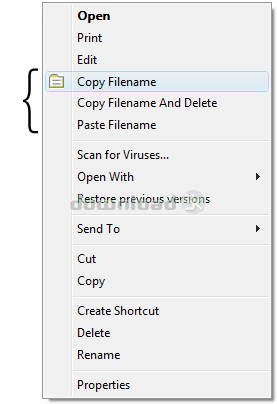
Windows has no built in way to copy a filename or folder listing to the clipboard. For a single file, you can use File > Rename, CTRL+C, then ESC to copy a filename to the clipboard, but this is quite tedious if you have to do it frequently or for lots of files.CopyFilenames comes to the rescue! This adds an extra menu command to the context menu in Windows Explorer (this is the menu that pops up when you right click on a file). This command lets you copy the names of all selected files or folders in one operation!
It doesn't just stop there - you can also include the size or date of the file, and have the full path instead of just the name. If you have selected the option to copy the full path, you can also select to have the backslashes doubled up (programmers will appreciate the value of this), or use forward slashes instead. There is also an option to include either single or double quotes around the names.
In addition to being able to copy filenames, this utility also adds two other commands which appear when appropriate. These commands can be used to replace one file with another. This is useful in the situation where you have two files in a folder, and you want to delete one, and rename the other to the name of the file that was deleted. Using built in Windows commands, you would need to select the file to delete, then File > Rename, CTRL+C, then ESC, File > Delete, select the other file, File > Rename, CTRL+V, then Return. CopyFilenames reduces this to two steps: right click on the first file and choose Copy Filename and Delete, then right click on the second file and choose Paste Filename.
CopyFilenames is a real time saver if you have to work with filenames at all. It is especially useful for programmers, web developers, technical authors and systems administrators.
What's new in this version: Improved Windows 10 support
Antivirus information
Download3K has downloaded and tested CopyFilenames on 27 Dec 2023 with some of Today's best antivirus engines and you can find below, for your convenience, the scan results:
-
Avast:
Clean -
Avira:
Clean -
Kaspersky:
Clean -
McAfee:
Clean -
NOD32:
Clean

Popular downloads in System Utilities
-
 Realtek AC'97 Drivers A4.06
Realtek AC 97 sound driver. -
 Windows 7 Service Pack 1 (SP1) 32-bit & 64-bit (KB976932)
The first service pack for Windows 7. -
 Realtek High Definition Audio Driver for Vista, Win7, Win8, Win8.1, Win10 32-bit R2.82
High definition audio driver from Realtek. -
 .NET Framework 2.0
The programming model of the .NET -
 Driver Cleaner Professional 1.5
Improved version of Driver Cleaner -
 RockXP 4.0
Allows you to change your XP product key -
 Realtek AC'97 Drivers for Vista/Win7 6305
Multi-channel audio CODEC designed for PC. -
 DAEMON Tools Lite 12.3.0.2297
The FREE Virtual CD/DVD-ROM-EMULATOR. -
 AutoCorect 4.1.5
Diacritice la comanda, punctuatie automata. -
 SIW 16.08.0603
SIW - System Information for Windows
User rating
0/5 (0 votes)
Your rating

-
OS
Win10 x32,Win10 x64,Win8 x32,Win8 x64,Win7 x32,Win7 x64,WinVista,WinVista x64,WinXP -
License
Freeware -
Price
$0 -
Updated
12/27/2023 -
Downloads
521 (1 last week) -
Size
2.07 MB -
MD5
a7868f7ebdf8293cb8cf0f70aab2a516 -
SHA1
10c0c9fd9ca88a0b3f039fd96b4b530e60a6184d -
Developer
ExtraBit Software Ltd.