Handy Start Menu 1.80
Developed by ChemTable Software
-
Windows
-
setup file handy-start-menu-setup.exe (7.03 MB)
-
Freeware
Select a download mirror:
- Developer Link 1 (non https handy-start-menu-setup.exe)
- Download3k US (handy-start-menu-setup.exe)
- Download3k EU (handy-start-menu-setup.exe)
MD5: 8069b474af9c79d7c0e351102309c5c7
All files are original. Download3K does not repack or modify downloads in any way. Check MD5 for confirmation.
Developer Description
"Makes working with your Start Menu easier"
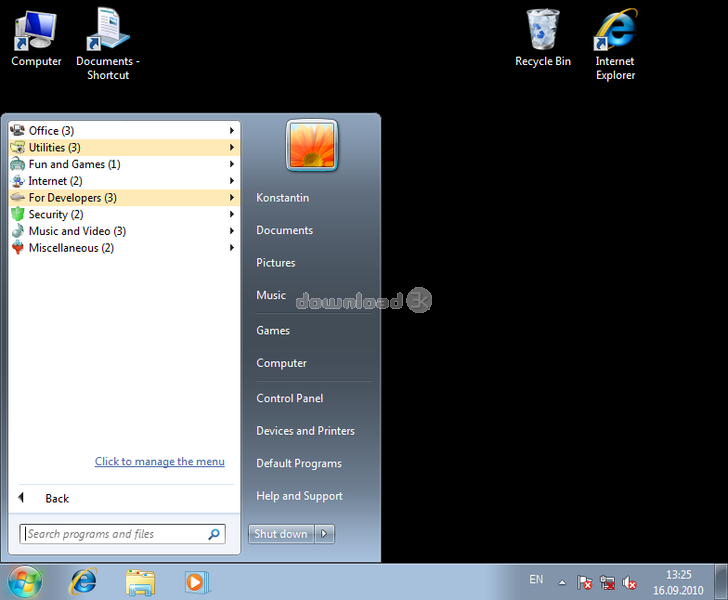
The standard Windows Start menu is far from ideal. Too often users find themselves taking too long to look for an application they want to start. This happens because the Start menu often has a very long list of programs that are installed on the system. So, it takes quite some time to find the application you want to run.The Handy Start Menu program allows you to get rid of this problem by grouping Start menu applications into categories according to their purpose. Because applications are sorted automatically, the user is not required to do anything in most situations.
There is also another inconvenience in using the standard Start menu. To run a program, you need to open a folder that contains that application. But why do we need to open a folder and select the main application shortcut every time we want to run a program? When you start using the Handy Start Menu, the menu folders become shortcuts. A single click on a program folder is enough to run a relevant application automatically. A folder does not lose its properties: It contains child items as before, and you can easily open any of them.
It is important to note that the Handy Start Menu only applies a more convenient way of representing the content of the Start menu, rather than modifying files and folders physically. At any time, you can easily restore the standard look of the Start menu by disabling the Handy Start Menu program.
Requirements: 32 MB RAM
What's new in this version: * The program puts back the Start menu under Windows 8 with the search field and the Shutdown button in it. These elements are absent in the standard interface of the above OS. * The program works more stable now. * Fixed bugs.
Antivirus information
Download3K has downloaded and tested Handy Start Menu on 26 Dec 2012 with some of Today's best antivirus engines and you can find below, for your convenience, the scan results:
-
Avira:
Clean -
Kaspersky:
Clean -
NOD32:
Clean

Popular downloads in System Utilities
-
 Realtek AC'97 Drivers A4.06
Realtek AC 97 sound driver. -
 Windows 7 Service Pack 1 (SP1) 32-bit & 64-bit (KB976932)
The first service pack for Windows 7. -
 Realtek High Definition Audio Driver for Vista, Win7, Win8, Win8.1, Win10 32-bit R2.82
High definition audio driver from Realtek. -
 .NET Framework 2.0
The programming model of the .NET -
 Driver Cleaner Professional 1.5
Improved version of Driver Cleaner -
 RockXP 4.0
Allows you to change your XP product key -
 Realtek AC'97 Drivers for Vista/Win7 6305
Multi-channel audio CODEC designed for PC. -
 DAEMON Tools Lite 12.3.0.2297
The FREE Virtual CD/DVD-ROM-EMULATOR. -
 AutoCorect 4.1.5
Diacritice la comanda, punctuatie automata. -
 SIW 16.08.0603
SIW - System Information for Windows
User rating
2.5/5 (2 votes)
Medium
Your rating

-
OS
WinVista,WinVista x64,Windows Vista Ultimate,Windows Vista Ultimate x64,Windows Vista Starter,Window -
License
Freeware -
Price
$0.00 -
Updated
12/25/2012 -
Downloads
440 (2 last week) -
Size
7.03 MB -
MD5
8069b474af9c79d7c0e351102309c5c7 -
SHA1
6c75b45ef17d69dc59e2b419b40a0e4a97efa755 -
Developer
ChemTable Software