Copywhiz 4.0
- Buy $19.95
- Developer Link 1 (non https CopywhizSetup.exe)
- Developer Link 2 (non https CopywhizSetup64.exe)
- Download3k US (CopywhizSetup.exe)
- Download3k EU (CopywhizSetup.exe)
MD5: 126645bcf80f9cf2b7faa199b472fe79
All files are original. Download3K does not repack or modify downloads in any way. Check MD5 for confirmation.
Review & Alternatives
"Flexible file copy program for Windows"
Overview
Copywhiz (formerly known as Piky Basket) is a compact file copy program for Windows which can be operated not only from Windows Explorer but other files managers as well, such as XYPlorer, Total Commander, xplorer2, Directory Opus (dopus), RecentX and ExplorerXP. It allows you to check which files are actually going to be copied and give you the ability to gather files from different folders and paste them in one location altogether. It will not stop upon an error, but it can either retry copying the file or ignore it and continue with the rest of the files.
Installation
It’s very easy to install this software, as the only thing you have to do is follow the small number of steps and in a few minutes it will be ready for use. No special configuration needed, and it doesn’t include any 3rd party software. It is completely clean from any kind of malware.
Copywhiz can run under Windows XP, Vista and 7, 32 or 64-bit versions.
Interface
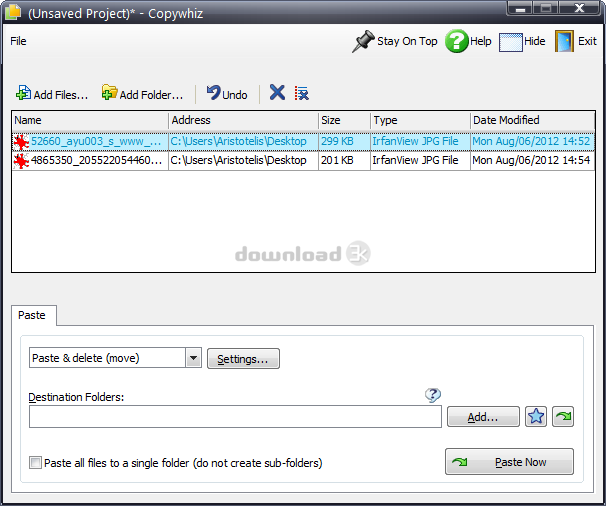
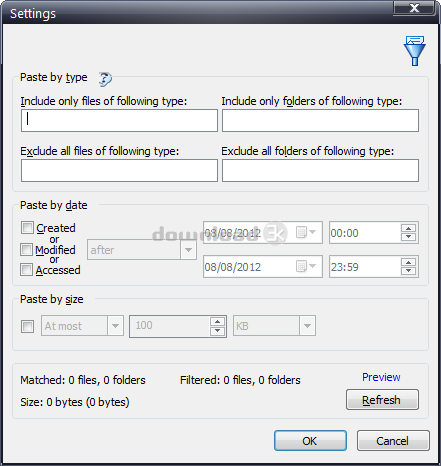
The interface is modern yet simple. You just drag and drop the files you want to copy into the main window and then pick the destination folder. Clicking the “Paste now” button will begin the copying process. There are a few settings you can change beforehand, for example you can choose if you want to copy the selected files, move them or create a zip file with them. From the settings menu you can make other kinds of configurations, like paste items by type, date or size.
If you don’t want to open the program each time you want to copy files you can do that by right-clicking on them and choosing the appropriate action from the Copywhiz context menu entry.
Pros
You can copy only the new or modified files since a date of your choice, instead of copying all the selected files. Other copy features include pasting by type, which lets you paste only particular file types, and pasting by size, in which case you select the size of the files you want to be copied.
In addition, you can use Copywhiz like a small backup utility. Just select the files you want to backup and choose “Paste as compressed .zip file” from the paste drop-down menu.
Before the copy process starts you can review the files to be copied first to make sure you don’t miss any. If the program encounters an error while copying, it will ask you if you want to retry copying the problematic file or skip it. If the file is in use, Copywhiz will show you which process is using it, or if the disk is full then it will tell you how much space is needed in order to complete the task successfully. You have the option to copy locked files on next restart.
You can save the list of files to be copied so that you can repeat the process again in the future.
Cons
We didn’t experience any problems while testing the program, nor did we notice feature it lacks. It does an excellent job.
Alternatives
TeraCopy (free) is one of the few programs that are used to copy and move files, instead of using Windows Explorer’s copy function. It is slightly faster than Copywhiz, but they share about the same features. Ycopy (free) is another tool with the same purpose, but it is less functional than the aforementioned programs due to its lack of extensive features.
Conclusion
Copywhiz can prove to be useful in many occasions, where you need to copy a large number of files, or even in small tasks such as copying just a few files. It won’t bother you while working, and can prove to be quite helpful at times so give it a try and see how it works out for you.

Requirements: None
What's new in this version: Made the program more intuitive.
Antivirus information
-
Avast:
Clean -
Avira:
Clean -
Kaspersky:
Clean -
McAfee:
Clean -
NOD32:
Clean

Popular downloads in System Utilities
-
 Realtek AC'97 Drivers A4.06
Realtek AC 97 sound driver. -
 Windows 7 Service Pack 1 (SP1) 32-bit & 64-bit (KB976932)
The first service pack for Windows 7. -
 Realtek High Definition Audio Driver for Vista, Win7, Win8, Win8.1, Win10 32-bit R2.82
High definition audio driver from Realtek. -
 .NET Framework 2.0
The programming model of the .NET -
 Driver Cleaner Professional 1.5
Improved version of Driver Cleaner -
 RockXP 4.0
Allows you to change your XP product key -
 Realtek AC'97 Drivers for Vista/Win7 6305
Multi-channel audio CODEC designed for PC. -
 DAEMON Tools Lite 12.0.0.2126
The FREE Virtual CD/DVD-ROM-EMULATOR. -
 SIW 14.1.0417
SIW - System Information for Windows -
 AutoCorect 4.1.5
Diacritice la comanda, punctuatie automata.


-
OS
WinXP,WinVista,WinVista x64,Win7 x32,Win7 x64,Windows2003,Windows Vista Ultimate,Windows Vista Ultim -
License
Shareware -
Price
$19.95 Buy -
Updated
10/12/2020 -
Downloads
474 (1 last week) -
Size
22.81 MB -
MD5
126645bcf80f9cf2b7faa199b472fe79 -
SHA1
774d981d25217a3d48b37c1690645e1efc662ce1 -
Developer
Conceptworld Corporation