SmartVersion 3.6
Developed by Gilles Vollant
-
Windows
-
setup file smartvs36.exe (1.17 MB)
-
Shareware
Buy or select mirror:
- Buy $30
- Developer Link 1 (non https smartvs36.exe)
- Developer Link 3 (non https smartvs36.exe)
- Download3k US (smartvs36.exe)
- Download3k EU (smartvs36.exe)
MD5: d796ce909ebb84425f444b274d91090f
All files are original. Download3K does not repack or modify downloads in any way. Check MD5 for confirmation.
Developer Description
"A smart tool to make multi-version archives"
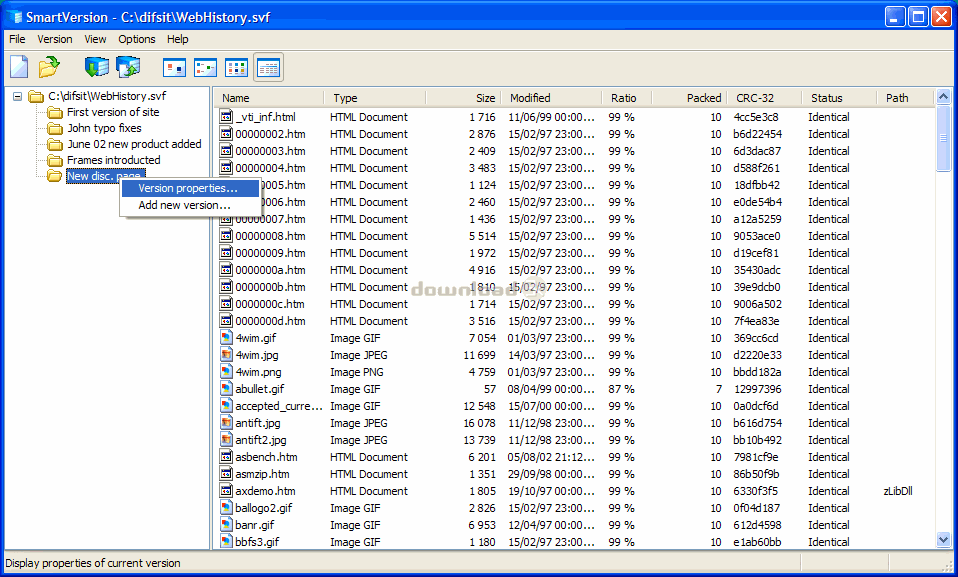
SmartVersion offers users a centralized location to archive different versions of one file for their fast retrieval. This is especially useful for people who need to save their work in incremental steps. Examples include programmers keeping track of different versions of their software at the various stages, business people working on proposals, graphic designers who make frequent adjustments to their art, writers experimenting with different ideas for manuscripts, and webmasters experimenting with different styles of webpages. Traditionally, when users work on files which often need to be changed, they either constantly overwrite previous versions so they work on a single file only, or save each version as a separate file. Overwriting seems to be a convenient and resource saving method of working, until they need to retrieve previous versions of their work. They can do this by either undoing all their work, or starting everything from scratch. Alternatively, if users try saving every single version of their work as separate files, this inevitably results in unnecessary, virtually identical extra files which waste valuable hard disk space. SmartVersion provides a practical alternative by keeping track of subsequent versions of files saved as patches of the original file. For example, as a landscape designer, you may want to use Smart Version to create several versions of your landscape project with proposed changes. They can be emailed to your client for a review. Only the first version of the file has the size of the original project. Then, as you both move along with the project, you email each other only Smart Version files, which contain only changes. Therefore the size of the file is small and it can be easily emailed even over a slow internet connection. After specifying the location of the first version of this patch, you extract the latest version with all the changes. Console and Gui version for WinXP to Win10 and Server; console for Osx and Linux.Antivirus information
Download3K has downloaded and tested SmartVersion on 30 Jun 2025 with some of Today's best antivirus engines and you can find below, for your convenience, the scan results:
-
Avast:
Clean -
Avira:
Clean -
Kaspersky:
Clean -
McAfee:
Clean -
NOD32:
Clean

Popular downloads in System Utilities
-
 Realtek AC'97 Drivers A4.06
Realtek AC 97 sound driver. -
 Windows 7 Service Pack 1 (SP1) 32-bit & 64-bit (KB976932)
The first service pack for Windows 7. -
 Realtek High Definition Audio Driver for Vista, Win7, Win8, Win8.1, Win10 32-bit R2.82
High definition audio driver from Realtek. -
 .NET Framework 2.0
The programming model of the .NET -
 Driver Cleaner Professional 1.5
Improved version of Driver Cleaner -
 RockXP 4.0
Allows you to change your XP product key -
 Realtek AC'97 Drivers for Vista/Win7 6305
Multi-channel audio CODEC designed for PC. -
 DAEMON Tools Lite 12.3.0.2297
The FREE Virtual CD/DVD-ROM-EMULATOR. -
 AutoCorect 4.1.5
Diacritice la comanda, punctuatie automata. -
 SIW 16.08.0603
SIW - System Information for Windows
User rating
2.5/5 (3 votes)
Medium
Your rating

-
OS
Windows 8,WinXP,WinVista,WinVista x64,WinServer,Win7 x32,Win7 x64 -
License
Shareware -
Price
$30 Buy -
Updated
6/30/2025 -
Downloads
608 (1 last week) -
Size
1.17 MB -
MD5
d796ce909ebb84425f444b274d91090f -
SHA1
deb5d3509d572fa7e2b9f116ed268e77fa74907c -
Developer
Gilles Vollant