KeepSafe 1.1
Developed by Stardock Systems
-
Windows
-
setup file keepsafe_public.exe (2.81 MB)
-
Shareware
Buy or select mirror:
- Buy $29.95
- Developer Link 1 (non https keepsafe_public.exe)
- Download3k US (ver 1.1, keepsafe_public.exe)
- Download3k EU (ver 1.1, keepsafe_public.exe)
MD5: f0f741e4e81ba15089391c03427344a4
All files are original. Download3K does not repack or modify downloads in any way. Check MD5 for confirmation.
Developer Description
"Program for data protection and revisioning."
KeepSafe is the ultimate file protection and revisioning program. It offers a seamless way to protect all of your most important files as you work on them – in real time! It does not replace a full system backup, but rather provides protection during those times between backups and only works on files you actually change – saving disc space.When installed, KeepSafe can be configured to protect certain file types (i.e.-.doc, .xls, .pst, etc.) or entire directories (i.e. "My Documents"). From then on, anytime a change is saved to one of those files, KeepSafe will automatically back up that file to a user defined location (typically a server, external drive, or backup directory on local machine).
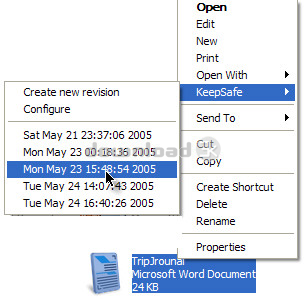
KeepSafe can even keep multiple revisions (the number set by the user), so if a key data file gets corrupted, the user can right click on that file and choose to return to a previous version from 20 seconds ago or 20 days ago. KeepSafe is so seamless it works without you even realizing its working. Users never have to remember to backup their important files anymore. KeepSafe does it automatically. Users, once they've customized their setting definitions won't have to remember to backup their important files anymore. KeepSafe will do it automatically without hot keys or hot buttons to worry about.
Have you ever had a document become corrupted just when you were saving it? Have you ever overwritten an important file, wished you could go back to an earlier version, or had your hard drive crash and your most recent backup was a month old? Do you have a computer? Then you need KeepSafe!
KeepSafe 1.1 adds "Diff" support so that only changes in new versions are saved rather than the entire file. You can try it out for yourself. Stardock originally developed this to solve the problem of people simply not making backups. The solution, KeepSafe, integrates data archiving into the file system itself.
Requirements: Requires Windows XP, 2003
Antivirus information
Download3K has downloaded and tested KeepSafe on 12 May 2012 with some of Today's best antivirus engines and you can find below, for your convenience, the scan results:
-
Avira:
Clean -
Kaspersky:
Clean -
NOD32:
Clean

Popular downloads in System Utilities
-
 Realtek AC'97 Drivers A4.06
Realtek AC 97 sound driver. -
 Windows 7 Service Pack 1 (SP1) 32-bit & 64-bit (KB976932)
The first service pack for Windows 7. -
 Realtek High Definition Audio Driver for Vista, Win7, Win8, Win8.1, Win10 32-bit R2.82
High definition audio driver from Realtek. -
 .NET Framework 2.0
The programming model of the .NET -
 Driver Cleaner Professional 1.5
Improved version of Driver Cleaner -
 RockXP 4.0
Allows you to change your XP product key -
 Realtek AC'97 Drivers for Vista/Win7 6305
Multi-channel audio CODEC designed for PC. -
 DAEMON Tools Lite 12.3.0.2297
The FREE Virtual CD/DVD-ROM-EMULATOR. -
 AutoCorect 4.1.5
Diacritice la comanda, punctuatie automata. -
 SIW 16.08.0603
SIW - System Information for Windows
User rating
0/5 (0 votes)
Your rating

-
OS
WinXP,Windows2003 -
License
Shareware -
Price
$29.95 Buy -
Updated
4/30/2026 -
Downloads
436 (1 last week) -
Size
2.81 MB -
MD5
f0f741e4e81ba15089391c03427344a4 -
SHA1
2874b58f940c932bc3dd75db3a1799e939a905c8 -
Developer
Stardock Systems