EzBackup 5.0.5.5
Developed by Data Protection Solutions by Arco
-
Windows
-
setup file Download EzBackup_5.0_Install_P now.exe (347.63 KB)
-
Shareware
Buy or select mirror:
- Buy $19.99
- Developer Link 1 (non https)
- Developer Link 2 (non https EzBackup_5.0_Install_S.exe)
- Download3k US (Download EzBackup_5.0_Install_P now.exe)
- Download3k EU (Download EzBackup_5.0_Install_P now.exe)
MD5: 494675ecd4c9ac9a5bace5ffd160cb84
All files are original. Download3K does not repack or modify downloads in any way. Check MD5 for confirmation.
Developer Description
"The easiest way to Backup & Restore"
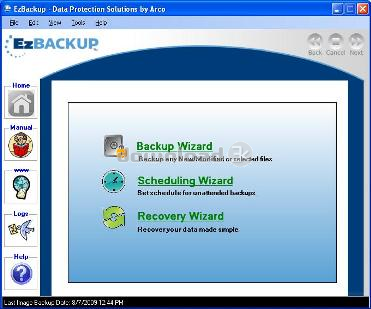
EzBackup transfers an exact copy of your hard drive onto another drive. This image backup, or clone, of your drive contains your operating system, all of your programs and preferences, plus your data files and any partitions. You don't have to do anything but select your backup drive and click OK. EzBackup will take it from there.Once EzBackup image backup software has created this disk image, you're ready to schedule your automatic backups. Just point and click to select the files you want backed up on a regular basis and the times you want your backups to run. You can schedule as many as 8 backups a day.
Choose individual files and folders or entire categories of files-- all of your photos, your music or even your entire My Documents folder. EzBackup can even backup Outlook and Outlook Express files. Or, you can simply choose to backup only new files and those that have been modified since your last backup. EzBackup image backup will run your automatic backups in the background while you work or when you’re away.
You also have the option to backup manually anytime. You can even set backups to begin whenever a particular event takes place. For example, if your external backup drive has an action or start button, you can push the button to start a backup. EzBackup can overwrite old backups with new ones or keep multiple dated backups.
If you inadvertently delete a file or folder, you'll be able to restore it instantly from your most recent backup or from an earlier copy. If you corrupt your operating system or lose your boot drive due to a disk crash, you'll be able to restore your boot drive quickly and easily. No need to start madly searching for application CDs or to search the internet for the latest updates and patches for your programs and hardware. You'll be up and running again in no time!
Requirements: 512 MB RAM, 1 GB Hard Disk Space, 800 x 600 Screen Resolution, 4x CD-ROM Drive
What's new in this version: Fix bugs
Antivirus information
Download3K has downloaded and tested EzBackup on 20 Dec 2012 with some of Today's best antivirus engines and you can find below, for your convenience, the scan results:
-
Avira:
Clean -
Kaspersky:
Clean -
NOD32:
Clean

Popular downloads in System Utilities
-
 Realtek AC'97 Drivers A4.06
Realtek AC 97 sound driver. -
 Windows 7 Service Pack 1 (SP1) 32-bit & 64-bit (KB976932)
The first service pack for Windows 7. -
 Realtek High Definition Audio Driver for Vista, Win7, Win8, Win8.1, Win10 32-bit R2.82
High definition audio driver from Realtek. -
 .NET Framework 2.0
The programming model of the .NET -
 Driver Cleaner Professional 1.5
Improved version of Driver Cleaner -
 RockXP 4.0
Allows you to change your XP product key -
 Realtek AC'97 Drivers for Vista/Win7 6305
Multi-channel audio CODEC designed for PC. -
 DAEMON Tools Lite 12.3.0.2297
The FREE Virtual CD/DVD-ROM-EMULATOR. -
 AutoCorect 4.1.5
Diacritice la comanda, punctuatie automata. -
 SIW 16.08.0603
SIW - System Information for Windows
User rating
5/5 (1 votes)
Excellent
Your rating

-
OS
Win2000,Win7 x32,Win7 x64,WinVista,WinVista x64,WinXP -
License
Shareware -
Price
$19.99 Buy -
Updated
12/19/2012 -
Downloads
250 (3 last week) -
Size
347.63 KB -
MD5
494675ecd4c9ac9a5bace5ffd160cb84 -
SHA1
edebd6147f5f6e7a8e6c4245121ded462e602fb3 -
Developer
Data Protection Solutions by Arco