Acronis True Image 2015 for PC 1.1
- Buy $49.99
- Developer Link 1 (non https AcronisTrueImage2015_web_trial_en-US.exe)
- Download3k US (AcronisTrueImage2015_web_trial_en-US.exe)
- Download3k EU (AcronisTrueImage2015_web_trial_en-US.exe)
MD5: 4491e1bc6ae32382b189439284204f2c
All files are original. Download3K does not repack or modify downloads in any way. Check MD5 for confirmation.
Review & Alternatives
"Backup, recovery, and data migration for PC"
Winner Best software in 2014 -Â Backup & Restore.
Overview
True Image by Acronis exists to ensure that your important data such as images, music, documents and applications will be well protected and easily recovered in the event of a disaster. Accidents happen, viruses hurt and your information is important, so True Image can be quite helpful.
InstallationÂ
The size of the setup file is 226 MB, it runs on all Windows versions from XP to Win7 with a shareware license. You can download the trial for free or purchase the “full version” for fifty dollars. Upon opening the file, you’ll be taken to the first install screen that gives you several options. The installation is very straight forward. On the way you will be asked if you want to participate in the Acronis customer Experience Program. The goal is to have customers give feedback to help improve the program on future versions so join it, if you want.
If you’re installing as trial, you’ll be redirected to the Acronis site first in order to get the trial serial number, which will be sent via email.
You can go for the custom installation, complete installation or typical installation. If you are an advanced user and want a specific setup, choose custom. If the extra features are worth the disk space for you, then choose complete. Otherwise go with typical. Restart your computer and you’re done.
Interface
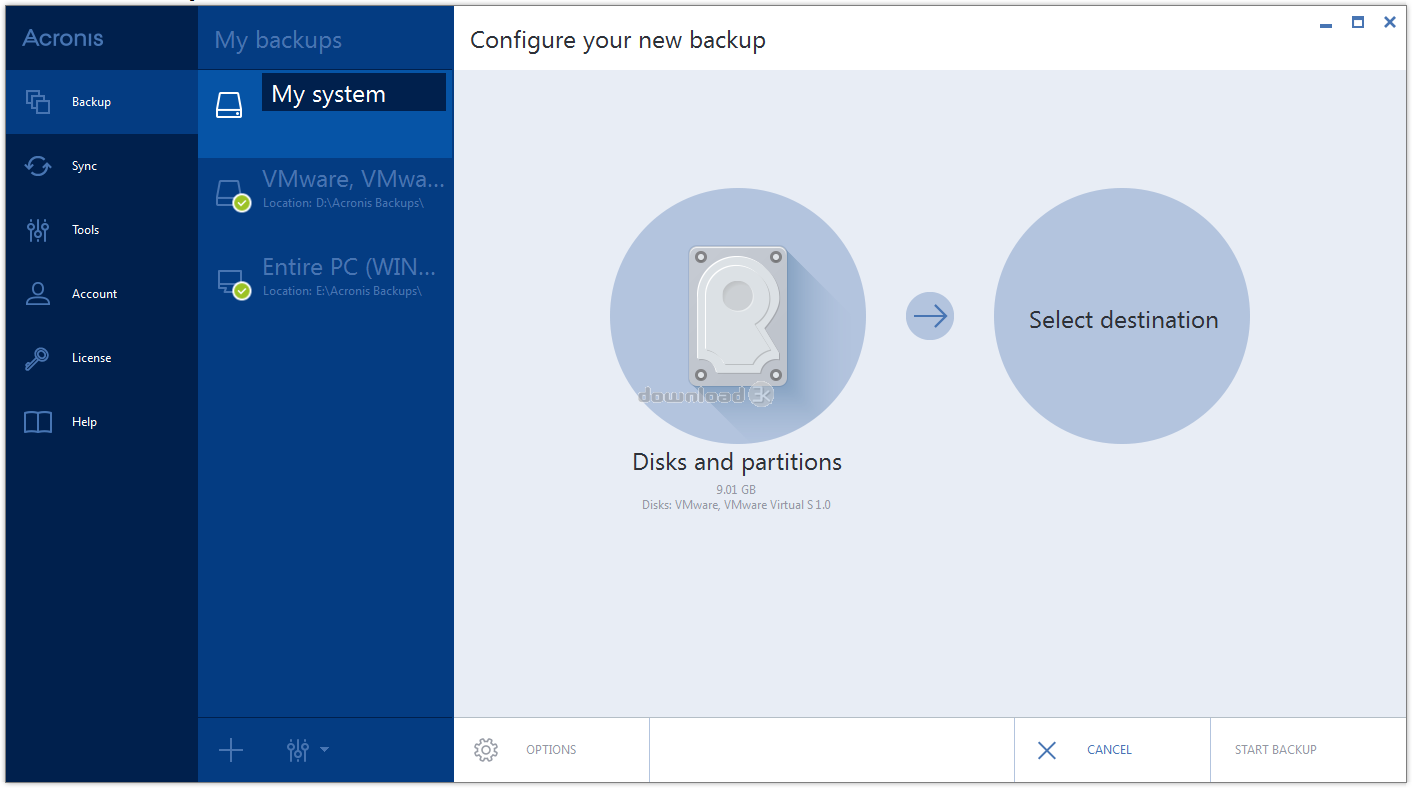
True Image by Acronis’ interface is very simple and pleasing to the eye. It looks sleek with the blues and whites of the program matching the rest of Windows 7 quite well. A backup button exists to back up important files, a recovery button exists to recover the files, a task log, the “try and decide feature” and Tools and Utilities. The “try and decide” feature allows you to open and download risky files without any risk. There will be more information on that in the pros section. Tools and Utilities gives you access to the different file protecting methods True Image puts at your disposal.
Pros
True Image by Acronis is built on the most advanced, highly-rated disk imaging technology available to consumers. You can copy your entire PC, including the operating system, applications, user settings, and all data and even encrypt them with 128, 192 or 256-bit Advanced Encryption Standard (AES). If you suffer a system or disk crash, virus attack or other failure, you can restore the entire system disk in minutes.
On-line backup lets you back up files on a remote source which will allow you to recover them even if your computer gets damaged or stolen.
The “try and decide” feature lets you try new software and browse the Web without endangering your computer from malware or unknown software. After testing, you can decide whether to keep or discard changes to your system.
Works across reboots and includes password protection for parental control.
One-click backup lets you decide what, where, and when to back up. After that, backups occur automatically and restores take just one more click.
True Image supports USB 3.0, which means you can make your backups even faster now if your PC supports USB 3.0.
When you replace a hard drive on your PC, True Image makes sure you don’t inadvertently give personal or organizational data to cyber thieves.
True Image by Acronis can restore all your installed applications with their settings and any updates you’ve performed.
Cons
The product is not without some bugs and error messages but this is to be expected with every major upgrade. Rest assure though, the Acronis team usually fixes all the bugs promptly while the support team is always available for your needs.
Alternatives
The Genie Backup Manager has the capacity to back up the Windows Registry, Favorites, Outlook data, and other system files as well as normal email and user data. The latest version has a disaster recovery option that allows you to backup and restore your Windows operating system as well as your data. The only negative is the program is so flexible that all the options may initially confuse some raw beginners.
Norton Ghost, NovaBACKUP, Handy Backup and Double Image are some other backup and restore options, but they are not all as easy to use as True Image by Acronis. A manual solution consisting of an external hard disk clone, on which you can manually backup important files, works as well, but it takes time to maintain and you have to place it somewhere safe.
Conclusion
True Image by Acronis is easy to use, effective, full of great features, and has only minor bugs and errors. It is a great and effective program to keep your files safe no matter what happens. Once you get it up and going, it does most of the work behind the scenes for you. I would definitely recommend this program.

Requirements: 1GB RAM; Processor Pentium 1 GHz or faster; 1.5 GB of free space on a hard disk.
What's new in this version: What's new: Entire PC backup New, touch-friendly interface Built-in data migration
Antivirus information
-
Avast:
Clean -
Avira:
Clean -
Kaspersky:
Clean -
McAfee:
Clean -
NOD32:
Clean

Popular downloads in System Utilities
-
 Realtek AC'97 Drivers A4.06
Realtek AC 97 sound driver. -
 Windows 7 Service Pack 1 (SP1) 32-bit & 64-bit (KB976932)
The first service pack for Windows 7. -
 Realtek High Definition Audio Driver for Vista, Win7, Win8, Win8.1, Win10 32-bit R2.82
High definition audio driver from Realtek. -
 .NET Framework 2.0
The programming model of the .NET -
 Driver Cleaner Professional 1.5
Improved version of Driver Cleaner -
 RockXP 4.0
Allows you to change your XP product key -
 Realtek AC'97 Drivers for Vista/Win7 6305
Multi-channel audio CODEC designed for PC. -
 DAEMON Tools Lite 12.0.0.2126
The FREE Virtual CD/DVD-ROM-EMULATOR. -
 SIW 14.0.0215
SIW - System Information for Windows -
 AutoCorect 4.1.5
Diacritice la comanda, punctuatie automata.



-
OS
WinXP,Win7 x32,Win7 x64,Windows 8,WinServer,WinVista,WinVista x64 -
License
Shareware -
Price
$49.99 Buy -
Updated
3/30/2024 -
Downloads
1522 (2 last week) -
Size
1.70 MB -
MD5
4491e1bc6ae32382b189439284204f2c -
SHA1
51c65afd99e44ee9dc81e0025a16f4f066c6c508 -
Developer
Acronis, LLC