Capture Assistant 1.5
Developed by Renovation Software
-
Windows
-
setup file Capture-Assistant-1.5-setup.zip (1.13 MB)
-
Shareware
Buy or select mirror:
- Buy $9
- Developer Link 1 (non https Capture-Assistant-1.5-setup.zip)
- Developer Link 2 (non https Capture-Assistant-1.5-setup.zip)
- Developer Link 3 (non https Capture-Assistant-1.5-setup.zip)
- Developer Link 4 (non https Capture-Assistant-1.5-setup.zip)
- Download3k US (Capture-Assistant-1.5-setup.zip)
- Download3k EU (Capture-Assistant-1.5-setup.zip)
MD5: 72ba7ba4e9474aa684cad9a0e6ed7bc2
All files are original. Download3K does not repack or modify downloads in any way. Check MD5 for confirmation.
Developer Description
"Capture Assistant - convenient capture tool."
Capture Assistant is the most convenient and easy to use text and graphics capture tool.It allows you to capture:
- text
- font information (font face, size and color)
- passwords hidden behind asterisks
- graphics
- color of any pixel on screen
Capture Assistant helps to save your time and increases your productivity.
Capture Assistant is built using TextGRAB SDK technology which allows to add capture functionality to any application.
Activating capture assistant
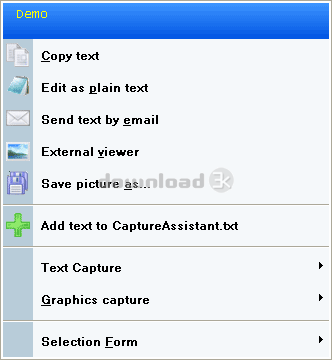
Default hot keys to activate Capture Assistant are: Ctrl+Shift. Just press it and select any text, click on any word or password, select any area on screen. After you will release left mouse button - Capture Assistant main menu will appear.
Capturing text
Capture Assistant extracts text from any window, even if copy/paste is not available (list controls, tree controls, status bars, protected documents, buttons, etc…). Capture Assistant preserves formatting of captured text.
Capture Assistant allows to extract font information (font face, size, color).
After text is captured, you can:
- copy it to clipboard
- edit it as plain text
- edit it in a rich text editor
- add text to notes file
- send text by email
- print captured text
Capturing graphics
Capture Assistant allows to capture any part of your screen in an easy way. After picture is captured you can:
- preview it
- copy to clipboard
- view in an external viewer
- edit picture
- print picture
- save picture
Color picker
Capture Assistant allows you to click on any pixel on screen and it will show you it's color.
Capturing passwords
Forgot your password? Capture Assistant can help you to extract passwords hidden behind asterisks.
Requirements: Windows
What's new in this version: - Improved 64-bits platforms compatibility. - Improved Vista compatibility. - New function for reading text (Text to speech). - Multilanguage user interface. - Experimental Windows 7 compatibility.
Antivirus information
Download3K has downloaded and tested Capture Assistant on 29 Aug 2016 with some of Today's best antivirus engines and you can find below, for your convenience, the scan results:
-
Avast:
Clean -
Avira:
Clean -
Kaspersky:
Clean -
NOD32:
Clean

Popular downloads in System Utilities
-
 Realtek AC'97 Drivers A4.06
Realtek AC 97 sound driver. -
 Windows 7 Service Pack 1 (SP1) 32-bit & 64-bit (KB976932)
The first service pack for Windows 7. -
 Realtek High Definition Audio Driver for Vista, Win7, Win8, Win8.1, Win10 32-bit R2.82
High definition audio driver from Realtek. -
 .NET Framework 2.0
The programming model of the .NET -
 Driver Cleaner Professional 1.5
Improved version of Driver Cleaner -
 RockXP 4.0
Allows you to change your XP product key -
 Realtek AC'97 Drivers for Vista/Win7 6305
Multi-channel audio CODEC designed for PC. -
 DAEMON Tools Lite 12.3.0.2297
The FREE Virtual CD/DVD-ROM-EMULATOR. -
 AutoCorect 4.1.5
Diacritice la comanda, punctuatie automata. -
 SIW 16.08.0603
SIW - System Information for Windows
User rating
3.5/5 (2 votes)
Good
Your rating

-
OS
WinXP,Windows2000,Windows2003,Windows Vista Ultimate,Windows Vista Ultimate x64,Windows Vista Starte -
License
Shareware -
Price
$9 Buy -
Updated
8/29/2016 -
Downloads
315 (1 last week) -
Size
1.13 MB -
MD5
72ba7ba4e9474aa684cad9a0e6ed7bc2 -
SHA1
97eafedfe8d401850e83f95d3973a4c355a93f01 -
Developer
Renovation Software