Image Upload Column 2.3
Developed by ArtfulBits
-
Windows
-
setup file artfulbits_image_upload_v2.3_SP2016.zip (2.07 MB)
-
Shareware
Buy or select mirror:
- Buy $250
- Developer Link 1 (artfulbits_image_upload_v2.3_SP2016.zip)
- Developer Link 2 (artfulbits_image_upload_v2.3_SP2013.zip)
- Download3k US (artfulbits_image_upload_v2.3_SP2016.zip)
- Download3k EU (artfulbits_image_upload_v2.3_SP2016.zip)
MD5: 6bb91221d5b98dee52ef6dea6359c4b7
All files are original. Download3K does not repack or modify downloads in any way. Check MD5 for confirmation.
Developer Description
"Image Upload Column by ArtfulBits"
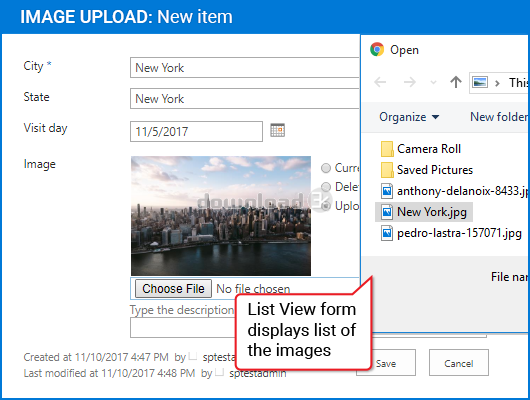
Image Upload component is intended to upload and display pictures for list item. It provides ability to directly select a picture in file browsing dialog, upload and display it in the list view.Component provides quick mechanism of manipulating picture upload, edit and delete actions. It is possible to setup filtering using predefined or custom extentions.
Features:
- Direct image uploading
- Image description support (used as alternative text for the picture)
- File extensions filtering (predefined and custom extentions supported)
- Ability to upload files on any type (documents, archives and others)
- Support any type of SharePoint list (not only Picture Library)
- Image thumbnails for list views
- Resize large images after upload
- Images stored in separate internal list subfolder (no conflict with attachments)
- Customizing image appearance in list view and item Edit/Display forms (specifying image size, limiting image size, displaying image as a link)
- Language pack support (desired localization could be added by request)
Why ArtfulBits Image Upload Column?
Default process of associating an image with a list item in SharePoint is not so obvious and comfortable. Default WSS 3.0 "Hyperlink or Picture" column does not allow uploading images via browsing and requires you to set the url of the image already existing on the site. In order to associate images with some item in a list in MOOS 2007 user should create the separate picture list and then set the url of certain image to picture column via the modal dialog.
Artfulbits Image Upload Column provides you with easier and flexible way to do this. Image Upload column allows the user to browse their local computer for image of interest. Once the image is selected, column will automatically upload the image and link it to the item.
Requirements: Windows Server 2012 R2 Standard,Windows Server (2016),SP Server 2016, Microsoft .NET Framework 4.5 +
What's new in this version: New Features: - Added SharePoint 2016 support Improvements: - GIF animated images are displayed in the list view - ICO images display is improved
Antivirus information
Download3K has downloaded and tested Image Upload Column on 18 Jun 2018 with some of Today's best antivirus engines and you can find below, for your convenience, the scan results:
-
Avast:
Clean -
Avira:
Clean -
Kaspersky:
Clean -
McAfee:
Clean -
NOD32:
Clean

Popular downloads in Software Development
-
 ASP windows registry editor 1.0
COM interface to windows registry in ASP/WSH -
 DOSBox 0.74-3
A free and useful DOS-emulator. -
 Bat To Exe Converter 3.0.9
Convert your batch-script files to exe files - Notepad++ 8.8.1
A free source code editor -
 Game Maker Lite 8.1
Hleps you to make your own games. -
 Kingo Android Root 1.5.0
KingoRoot best one-click android root tool. -
 VISCOM Video Media Player ActiveX SDK 10.0
video, audio playback activex control -
 plist Editor for Windows 1.0
Free Property List Editor for Windows. -
 Visual Studio Decompiler 7.3.8
Visual Studio .NET decompiler dll/exe -
 PSPad editor 5.5.1.825
PSPad editor is freeware programmer editor
User rating
0/5 (0 votes)
Your rating

-
OS
Win2000,WinXP,Win7 x32,Win7 x64,Windows 8,Windows 10,WinServer,WinOther,Windows2000,Windows2003,Wind -
License
Shareware -
Price
$250 Buy -
Updated
6/18/2018 -
Downloads
161 (1 last week) -
Size
2.07 MB -
MD5
6bb91221d5b98dee52ef6dea6359c4b7 -
SHA1
74f34a82e2b18b0d24560a8ae3d5742abaacef62 -
Developer
ArtfulBits