Discussion Column for SharePoint 2.0
Developed by ArtfulBits
-
Windows
-
setup file ArtfulBits_Discussion_v2.0_SP2013.zip (1.93 MB)
-
Shareware
Buy or select mirror:
- Buy $250
- Developer Link 1 (non https ArtfulBits_Discussion_v2.0_SP2013.zip)
- Developer Link 2 (non https ArtfulBits_Discussion_v1.61_SP2010.zip)
- Developer Link 3 (non https ArtfulBits_Discussion_v2.0_SP2007.zip)
- Download3k US (ArtfulBits_Discussion_v2.0_SP2013.zip)
- Download3k EU (ArtfulBits_Discussion_v2.0_SP2013.zip)
MD5: ce3c81906d08da31adced6b0d8105e5f
All files are original. Download3K does not repack or modify downloads in any way. Check MD5 for confirmation.
Developer Description
"Discussion Column for SharePoint"
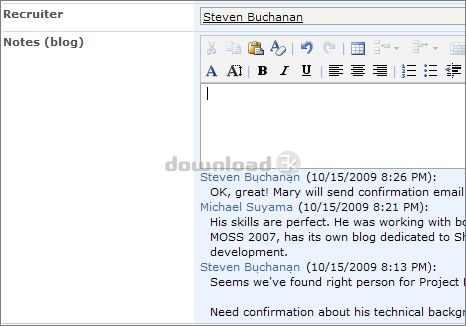
Discussion Column is intended to organize conversation in the list item without need to enable list versioning. Component allows entering rich text with formatting, images, tables, hyperlinks, etc.Actually Discussion is similar to an IM message system: many users are able to create rich-text messages, but there is no ability to modify previous messages. As IM, discussion control can show who and when has published post (configured in column settings).
Useful thing is that it is possible to show all conversations in list view or just a hyperlink to "View Item" form. It is helpfull when discussion has many items and page becomes congested.
You can also arrange your comments in chronological or reverse chronological order. User signature could be displayed on top or bottom of an entry.
Features:
- Organizing discussion without enabling list versioning
- Comments editing
- Filtering of empty records
- Ability to show whole discussion history or only link to it in list view
- Show user name as a link to user profile page
- Display posts in chronological or reverse chronological order
- Choosing position of user signature
- Import data (text) from existing SharePoint Multiple lines of text column
- Language pack support (desired localization could be added by request)
Why ArtfulBits Discussion Column?
It is possible to use standard SharePoint "Multiple lines of text" column with "Append Changes to Existing Text" option for organizing discussion, but:
- Versioning of a list has to be turned on
- New version is created each time items are edited
Even if you edit item, new record will be displayed in discussion history, whether it is empty or not.
ArtfulBits Discussion Column resolves these problems and avoids list versioning, also it does not append empty records to discussion history.
Requirements: Windows Server 2003/2008, Windows SharePoint Services v3, MOSS2007, SP2010, SP2013
What's new in this version: New Features: - Added SharePoint 2013 support - Added comments editing functionality Improvements: - Added item custom forms support - Added Column Data Adapter </products/sharepoint/column-data-adapter.aspx> integration - Added cross-browser support for comment editing - Added "Save site as template" support
Antivirus information
Download3K has downloaded and tested Discussion Column for SharePoint on 30 Jan 2017 with some of Today's best antivirus engines and you can find below, for your convenience, the scan results:
-
Avast:
Clean -
Avira:
Clean -
Kaspersky:
Clean -
NOD32:
Clean

Popular downloads in Software Development
-
 ASP windows registry editor 1.0
COM interface to windows registry in ASP/WSH -
 DOSBox 0.74-3
A free and useful DOS-emulator. -
 Bat To Exe Converter 3.0.9
Convert your batch-script files to exe files - Notepad++ 8.8.1
A free source code editor -
 Game Maker Lite 8.1
Hleps you to make your own games. -
 Kingo Android Root 1.5.0
KingoRoot best one-click android root tool. -
 VISCOM Video Media Player ActiveX SDK 10.0
video, audio playback activex control -
 plist Editor for Windows 1.0
Free Property List Editor for Windows. -
 Visual Studio Decompiler 7.3.8
Visual Studio .NET decompiler dll/exe -
 PSPad editor 5.5.1.825
PSPad editor is freeware programmer editor
User rating
0/5 (0 votes)
Your rating

-
OS
Windows2003 -
License
Shareware -
Price
$250 Buy -
Updated
1/29/2017 -
Downloads
345 (2 last week) -
Size
1.93 MB -
MD5
ce3c81906d08da31adced6b0d8105e5f -
SHA1
129094125d5bde3582a0a102164db26779e44135 -
Developer
ArtfulBits