WirelessKeyView 2.23
- Developer Link 1 (wirelesskeyview.zip)
- Download3k US (ver 1.70, wirelesskeyview.zip)
- Download3k EU (ver 1.70, wirelesskeyview.zip)
MD5: a6fc2e2be35581df54089d21a6e6a42e
All files are original. Download3K does not repack or modify downloads in any way. Check MD5 for confirmation.
Review & Alternatives
"recovers lost wireless network keys (WEP/WPA)"
Overview
WirelessKeyView is a handy little application that gives you the ability to recover all wireless network security passwords/keys that you've used on your computer which utilize WPA or WEP encryption standards. In essence, this utility will help you recover your WiFi password, and any other wireless password that has been used on your system in the past.
Installation
This may be one of the most compact programs we've reviewed, at a file size of only about 50 kB. Surprisingly, it does not require any installation at all, as you simply extract it from the zip file and then run the program. After launching this utility you won't need to provide any input, as the information will instantly be displayed with no additional effort on your behalf.
Interface
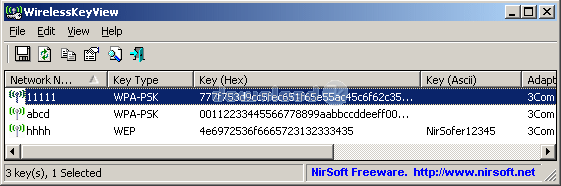
The interface really couldn't get any simpler, as it basically lists information in an easy-to-understand graph-like format that displays the Network Name, Key Type, Hex Key, and ASCII key. There are also eight self-explanatory button icons located along the top of the main window, which gives you easy access to basic features like an integrated search function, and the ability to save/export the returned data to a file.
Pros
-
Automatically scans your operating system's Wi-Fi manager to instantly recover every wireless password you've ever used, and then lists them within a centralized, easy-to-read interface
-
Supports the recovery of both WEP and WPA passwords
-
Not only displays the ASCII password, but also other useful information like the adapter type, adapter GUID, and the hex key
-
Lets you quickly copy recovered passwords to the clipboard by pressing Alt+Enter, which immediately launches a properties window that displays all of the passwords information within editable fields
-
Capable of generating HTML reports for specifically selected networks or the entire Wi-Fi manager database
-
Quickly gathers data provided by the 'Wireless Zero Configuration' Windows XP service, or the 'WLAN Auto Config ' Vista/7 service
-
Provides adequate help documentation that can walk anyone through the learning process in just a few minutes
-
Regularly updated with bug fixes by proficient developers that welcome feedback and recommendations
Cons
-
Some antivirus software may accidentally flag this application as a virus, although it should be noted that this is simply a false alert. View our antivirus report and see for yourself.
Alternatives
Perhaps the most notable alternative to WirelessKeyView would have to be Cain and Abel, a similar password recovery tool for windows. However, WirelessKeyView is a much simpler application in that it simply recovers WEP/WPA passwords, and does not have any advanced cracking capabilities like many other competitors. Another less capable alternative that can recover WEP keys is Wireless WEP Key Password Spy.
Conclusion
If you're having trouble remembering the password for your wireless Internet, and don't know how to browse through your systems Wi-Fi manager to find the key, this application would make an ideal solution. Even if you're a computer expert and can easily recover your Wi-Fi password, using WirelessKeyView is much faster and simpler than performing the process manually.

Antivirus information
-
Avast:
Clean -
Avira:
Clean -
Kaspersky:
Clean -
NOD32:
Clean

Popular downloads in Security
-
 Freegate Professional 7.90
Anti-censorship software. -
 MessenPass 1.42
Recovers instant messenger passwords -
 Hotspot Shield 12.8.3
Secure your wi-fi connection from hackers -
 Asterisk Key 10.0 Build 3538
Uncover passwords hidden behind asterisks. -
 CmosPwd 5.0
A cmos/bios password recovery application -
 Protected Storage PassView 1.63
recovers the Protected Storage passwords. -
 Windows Installer CleanUp Utility 2.5.0.1
Remove Windows Installer settings. - Hide Window Plus 4
Hide programs from taskbar and tray -
 Cain & Abel 4.9.56
Password recovery tool. -
 Asterisk Logger 1.04
Reveals the passwords behind asterisks.


-
OS
Win7 x32,Win7 x64,WinOther,WinServer,WinVista,WinVista x64,WinXP,Other -
License
Freeware -
Updated
11/19/2023 -
Downloads
9726 (1 last week) -
Size
65.07 KB -
MD5
a6fc2e2be35581df54089d21a6e6a42e -
SHA1
63f80a9454e72a8256125c3c6787bd25042924a9 -
Developer
NirSoft Freeware