HyperSnap 8.12.02
- Buy $39.95
- Developer Link 1 (non https HS7Setup.exe)
- Download3k US (HS7Setup.exe)
- Download3k EU (HS7Setup.exe)
MD5: 428abfc3be2830c79b45ee235b3999b4
All files are original. Download3K does not repack or modify downloads in any way. Check MD5 for confirmation.
Review & Alternatives
"Screen graphics + text capture & image editor"
Overview
HyperSnap is a fast, powerful, and feature-rich screen capture application that not only facilitates the process of taking pictures of windows and areas of your operating system, but also gives you an extensive library of editing tools and resources within a centralized interface.
Installation
With a file size of about 11 MB, the software is quite large for a free screenshot utility, as most competitors are much more compact. Compatible with most versions of Windows, including 2000, XP, 2003, Vista, Server 2008, and 7.
Interface
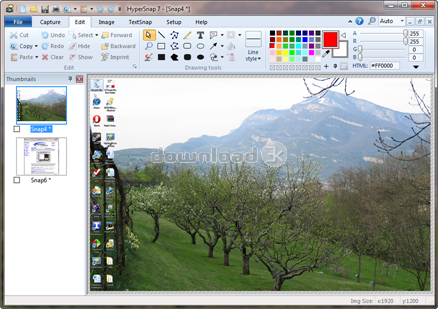
The user interface is so much more robust than a typical screenshot utility, with a host of image and text editing features laid out in a fashion that appears to be similar to a combination between Microsoft Office and MS Paint. The imported screenshot takes up most of the main window, with editing options displayed in a neatly organized toolbar equipped with a variety of coloring, shaping, and drawing tools. Fortunately, if you're not comfortable with the default layout you can customize the location and appearance of interface components to your liking.
Pros
-
Can take screenshots of any shape from any area of the screen, specific windows, multiple windows, and even from multiple monitors simultaneously
-
Supports unlimited undo/redo edits, so you can go forward and back as much as you'd like until you're satisfied with the output preview
-
Automatic color substitution enriches color hue and vibrancy for more stunning screenshots
-
Button capture feature makes it easy to take small screenshots of individual buttons within a window
-
Seamlessly integrates with the Windows clipboard to simplify copying and pasting images
-
Can also serve as a powerful image viewer/editor, as well as an image format converter (supporting the viewing and conversion of 20+ image formats)
-
TextSnap feature instantly captures all editable text fields from specified areas of the screen, and this text can then be pasted into a document for further editing
-
You can create screenshots in any shape you'd like
-
Personalize the user interface by rearranging menus/toolbars, assigning keyboard shortcuts to specific tasks, convert menus into toolbars for easy accessibility of certain features, and even assign VoiceCommands to HyperSnap functions
-
Can integrate with FTP servers to instantly upload images to a Web server
-
Is capable of taking elusive screenshots that other applications have a hard time capturing (i.e. – certain screens in Glide/DirectX games)
Cons
-
The TextSnap feature cannot read ornate fonts
Alternatives
Suitable alternatives to HyperSnap include Greenshot, Jing (Win, Mac), Shutter, FastStone Capture, SnagIt, Screenshot Captor, ZScreen, LittleSnapper, FireShot, and Shotty. Of these alternatives, GreenShot is by far the most popular, and many believe that it offers a greater level of convenience than HyperSnap, yet without the advanced editing capabilities. Shutter is perhaps the best alternative for the Linux operating system.
Conclusion
With a myriad of editing capabilities, convenient functionality that can be automated and/or executed with keyboard shortcuts, and powerful screen capturing capabilities, HyperSnap is destined to become an industry-leading screenshot application.

Requirements: Windows Vista or newer, 32 or 64-bit
What's new in this version: Bug fixes
Antivirus information
-
Avast:
Clean -
Avira:
Clean -
Kaspersky:
Clean -
McAfee:
Clean -
NOD32:
Clean

Popular downloads in Photo & Graphic
-
 Bandicam Screen Recorder 7.1.1.2158
Best Game, Video, Screen Recording Software -
 PhotoScape 3.7
A fun and easy photo editing software. -
 Magic Photo Editor 7.5
Easilly blend photo onto another picture. -
 SketchUp Make 16.1.1450 32-bit / 17.2.2555 64-bit
An easy-to-learn 3D modeling program. -
 jAlbum 34.3
Highly customizable web galleries for any site. -
 Shipping Container House Plans 1.1
Shipping Container House Plans Software -
 VEGAS Pro 21.0.0 Build 108
Provide the ultimate all-in-one environment -
 Corel PaintShop Pro 2023 25.2.0.58 Update 2
All you need to create fantastic photos! -
 Just Color Picker 5.9
Free colour picker and colour-editing tool. - JR Split File 1.2
Split a large file into smaller files



-
OS
Win7 x32,Win7 x64,Windows 8,Windows 10,WinServer,Windows Server 2008,Windows Server 2008r2,Windows S -
License
Shareware -
Price
$39.95 Buy -
Updated
10/5/2022 -
Downloads
2501 (2 last week) -
Size
8.85 MB -
MD5
428abfc3be2830c79b45ee235b3999b4 -
SHA1
632a4413b4219762ccacf75e9d8e864291545626 -
Developer
Hyperionics Technology LLC