Permission Analyzer 2.0.0
Developed by Perdemia
-
Windows
-
setup file Permission_Analyzer_64bit.zip (113.60 MB)
-
Shareware
Buy or select mirror:
- Buy $299
- Developer Link 1 (non https Permission_Analyzer_64bit.zip)
- Download3k US (Permission_Analyzer_64bit.zip)
- Download3k EU (Permission_Analyzer_64bit.zip)
MD5: 5fd2935b870aa84a78b6b2f91ad027d4
All files are original. Download3K does not repack or modify downloads in any way. Check MD5 for confirmation.
Developer Description
"Displays NTFS permissions per user or group"
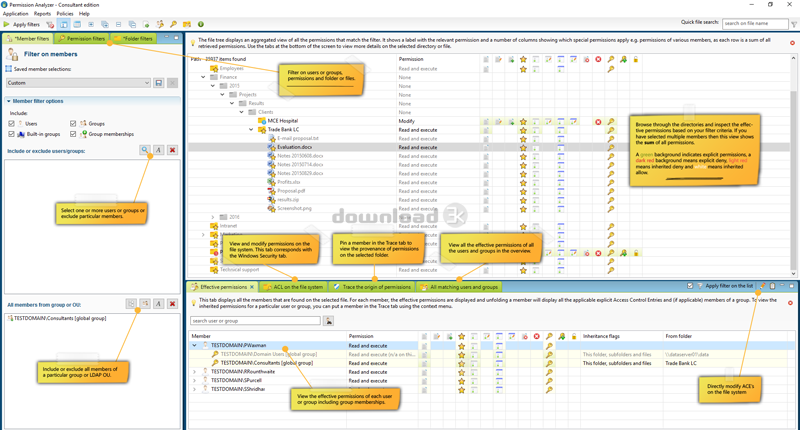
Permission Analyzer scans your network and combines NTFS permissions with user and group data from the Active Directory. All data that is stored locally can be retrieved to create overviews of permissions per group or user. You will be able to monitor permissions for entire user groups and receive notifications if undesired permissions are flagged within your network.Main features
Scanning the network
Configure the directories and LDAP Organizational Units to scan. All directory information and group memberships from LDAP are saved in a local database file. Run the scan whenever you like or schedule an automated scan. Permission Analyzer supports an external database, allowing multiple workstations to share the same information source.
Running your overviews
All information is saved on a database, allowing you to conduct targeted search queries in seconds, instead of scanning the whole network every time you want to apply a new filter. Add filters for specific members, all members of a group or LDAP OU, permissions or folders.
Tracing permissions
The main overview provides an aggregated summary of all permissions found and may contain the permissions of multiple users or groups. The Trace function is part of the overview and shows you the origin of permissions for a specific user or group and folder (via the group membership or parent folder they have been inherited). Use this view to zoom in on your search results.
Creating reports and policies
Save your filters as report and export them to HTML or CSV and e-mail. Use Permission Analyzer to run reports automatically using command-line parameters. Save your filters as policies and receive e-mail notifications if your policy report contains unwanted permissions.
What's new in this version: Better support for very large data sets, define policies and get notified by e-mail in case unwanted permissions are found in your network, better support for special permissions, scan specific OUs in the AD to scan, select multiple members, modify permissions and schedule reports.
Antivirus information
Download3K has downloaded and tested Permission Analyzer on 17 Oct 2021 with some of Today's best antivirus engines and you can find below, for your convenience, the scan results:
-
Avast:
Clean -
Avira:
Clean -
Kaspersky:
Clean -
McAfee:
Clean -
NOD32:
Clean

Popular downloads in Network tools
-
 SoftPerfect Network Scanner 26.5
Fast multipurpose IP, SNMP, NetBIOS scanner. -
 Netman 6.41
Netman - PC Remote Access & Control Software -
 TeamViewer 11.0.64630
Remote control and online meetings -
 Ammyy Admin 3.0
Ammyy Admin - Free Remote Desktop Sharing -
 Free IP Scanner 3.5
A very fast IP scanner and port scanner. -
 Tiny DHCP Server 1.3.5615
Tiny Dhcp Service for Windows. -
 Angry IP Scanner 3.9.1
A very fast and small IP scanner. -
 uTorrent 3.6.0 Build 47196
Efficient and feature rich BitTorrent client. -
 Internet TV & Radio Player 5.5.2
Watch TV and listen radio stations on your PC -
 StrongDC++ 2.42
Client for sharing in Direct Connect network.
User rating
4/5 (5 votes)
Very good
Your rating