NetworkActiv PIAFCTM 2.2.4
Developed by NetworkActiv
-
Windows
-
setup file NetworkActivPIAFCTMv2.2.exe (1.16 MB)
-
Freeware
Select a download mirror:
- Developer Link 1 (non https NetworkActivPIAFCTMv2.2.exe)
- Download3k US (NetworkActivPIAFCTMv2.2.exe)
- Download3k EU (NetworkActivPIAFCTMv2.2.exe)
MD5: 92b0c760a2de3ca718cb5592217647c4
All files are original. Download3K does not repack or modify downloads in any way. Check MD5 for confirmation.
Developer Description
"Easy yet advanced, quad-mode packet analyzer."
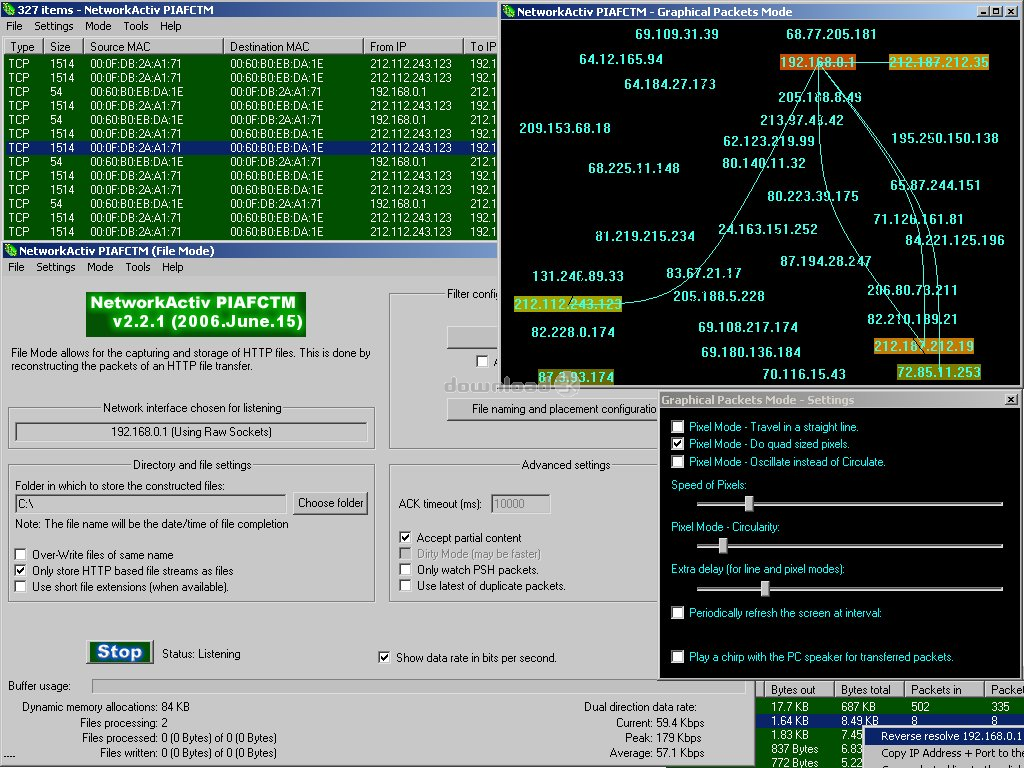
Easy yet advanced, quad-mode packet analyzer,Mode 1 (Packet Interceptor)
While in this mode, PIAFCTM captures and analyzes network data packets. PIAFCTM allows you to view special information encoded in each packet such as the source and destination IP addresses, the source and destination ports, and many other pieces of information. When capturing using the NetworkActiv PIAFCTM Packet Driver, data is captured at the ethernet level allowing you to see the MAC (Media Access Control) addresses of each computer from which you have received packets. Many packets can be captured in a short period of time, and so you may not wish to view them all. With PIAFCTM, you can filter the capturing of packets by IP address, port, packet size, protocol, and/or text-sub-string searching of each packet's content. Also, you can search for a text-sub-string within the current list of packets, save the list of packets to a text file, view the data payload content of each packet (in Hex, Decimal, Text, or standard Hex+Text style), and more.
Mode 2 (HTTP File Interceptor)
With this mode, you can capture images, web-pages, web-page initiated HTTP downloads, and more. This is done by the automated capturing and analyzing of HTTP (Hyper-Text Transfer Protocol) specific packets. You can filter the saving of files by IP address, port, file extension, and/or file size.
Mode 3 (Graphical Packets Mode)
Provides a graphical, effects like representation of network traffic. Can be configured in real-time.
Mode 4 (Statistical Mode)
Statistical Mode monitors and analyzes the network traffic and forms statistical information pertaining to each IP address, each IP address pair, and each local port.
Unlike many packet analyzers out there, this software does NOT require (nor does it use) WinPCap, nor any other third party extensions.
True Freeware: No ads, banners, spyware, or nags.
What's new in this version: Various bugs removed, generally optimised, and various other small improvements.
Antivirus information
Download3K has downloaded and tested NetworkActiv PIAFCTM on 30 Jan 2017 with some of Today's best antivirus engines and you can find below, for your convenience, the scan results:
-
Avast:
Clean -
Avira:
Clean -
Kaspersky:
Clean -
NOD32:
Clean

Popular downloads in Network tools
-
 SoftPerfect Network Scanner 26.5
Fast multipurpose IP, SNMP, NetBIOS scanner. -
 Netman 6.41
Netman - PC Remote Access & Control Software -
 TeamViewer 11.0.64630
Remote control and online meetings -
 Ammyy Admin 3.0
Ammyy Admin - Free Remote Desktop Sharing -
 Free IP Scanner 3.5
A very fast IP scanner and port scanner. -
 Tiny DHCP Server 1.3.5615
Tiny Dhcp Service for Windows. -
 Angry IP Scanner 3.9.1
A very fast and small IP scanner. -
 uTorrent 3.6.0 Build 47196
Efficient and feature rich BitTorrent client. -
 Internet TV & Radio Player 5.5.2
Watch TV and listen radio stations on your PC -
 StrongDC++ 2.42
Client for sharing in Direct Connect network.
User rating
0/5 (0 votes)
Your rating

-
OS
Windows2000,WinXP,Windows2003,Windows Vista Starter,Windows Vista Home Basic,Windows Vista Home Prem -
License
Freeware -
Updated
1/29/2017 -
Downloads
1376 (3 last week) -
Size
1.16 MB -
MD5
92b0c760a2de3ca718cb5592217647c4 -
SHA1
d5f813ac875fdc4eaae826d09c4962304aac9884 -
Developer
NetworkActiv