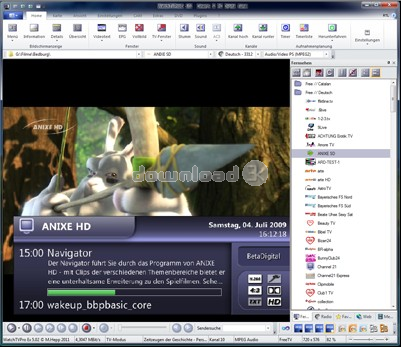
WatchTVPro Ex 5.12
Developed by Michael Hepp
-
Windows
-
setup file 7.html (33.89 MB)
-
Demo
Select a download mirror:
- Developer Link 1 (non https)
- Download3k US (ver 5.12, 7.html)
- Download3k EU (ver 5.12, 7.html)
MD5: 72ae3a2196e1d1b2ccd536152052ad61
All files are original. Download3K does not repack or modify downloads in any way. Check MD5 for confirmation.
Developer Description
"TV Software for digital PC DVB tv cards"
WatchTVPro is an alternative software to watch tv channels and radio via satellite, cable or terrestrial reception. It's developed since 2001.WatchTVPro has regularly updates and innovations (for registered customers)
- descrambling of PayTV with CI module and subscription card
- channel sorting to TV, radio and favorites (provider sorted)
- teletext as program window (mouse and keyboard-controlled)
- automatic station search
- channel lists can be imported from files with .wtv and .dvb formats
Program functions/interface:
- volume control for sound by mouse wheel
- "Snapshot" function (automatic numbering of the files)
- Treble/bass settings (hardware-dependent)
- channel search for channel names in the list
- channel settings can be changed without the need to restart the application
- program window freely scalable
- integrated editor for channel lists and favorites
- language choice for multilingual channels
- user friendly control bar
- muting
- program lock to limit the access of children and young people by pin number
- timer programming can be exported to the Windows task scheduler
- configurable channel list
- settings for brightness, contrast and color on the PC monitor
- control bars/menu bars configurable
- user interface language choice German/English/Dutch
- automatic shutdown of the computer after a timer recording possible
- plugin interface for extra function libraries
- NVOD channels can also selected by OSD ("geen button" function)
- simultaneous use of more then one TV cards is possible
- remote control support
- compatibility to Girder
- PVA/MPG Cutter for simple editing of PVA and MPG files
- DiSEqC support (Digital Sattelite Equipment Control)
- keyboard shortcuts for the most important functions can be set by the user
- Timeshift with an external MPEG2 codec possible
- CAM menu can be accesses using a window
Antivirus information
Download3K has downloaded and tested WatchTVPro Ex on 12 Apr 2012 with some of Today's best antivirus engines and you can find below, for your convenience, the scan results:
-
Avira:
Clean -
Kaspersky:
Clean -
NOD32:
Clean

Popular downloads in MP3 Audio Video
-
 Realtek High Definition Audio Driver for 2000/XP/2003 32/64-bit R2.74
High definition audio driver from Realtek. -
 3GP Player 2013 1.4
Free 3GP Player for Pc -
 iTunes 12.13.7.1
Manage and play your music collection. -
 Windows Media Player 11
One of the best media player -
 Total Video Converter 3.72
Total Video Converter -
 TVexe TV HD 6.0
Watch free live TV on your PC now+ Radio -
 K-Lite Codec Pack Full 18.9.0
A collection of codecs and related tools. -
 Windows Media Player 9 Codecs Pack
The latest Windows Media codecs -
 VLC media player 3.0.21
A portable app of VLC media player. -
 KMPlayer 4.2.3.21 x86 / 2025.1.21.12 x64
A movie and audio player.
User rating
0/5 (0 votes)
Your rating

-
OS
WinXP,Windows2003,Windows Vista Starter,Windows Vista Home Basic,Windows Vista Home Premium,Windows -
License
Demo -
Updated
3/7/2013 -
Downloads
795 (2 last week) -
Size
33.89 MB -
MD5
72ae3a2196e1d1b2ccd536152052ad61 -
SHA1
71f05969df58848f3fd60f34a2328d338dbdbd6f -
Developer
Michael Hepp