Raduga 3.9.6
Developed by WoLoSoft International
-
Windows
-
setup file Raduga-3.9.6-demo.exe (2.90 MB)
-
Demo
Select a download mirror:
- Developer Link 1 (non https Raduga-3.9.6-demo.exe)
- Download3k US (Raduga-3.9.6-demo.exe)
- Download3k EU (Raduga-3.9.6-demo.exe)
MD5: 7c9d7e5681ad48a8256d9154184e6698
All files are original. Download3K does not repack or modify downloads in any way. Check MD5 for confirmation.
Quick Review
"A music automation software programme."
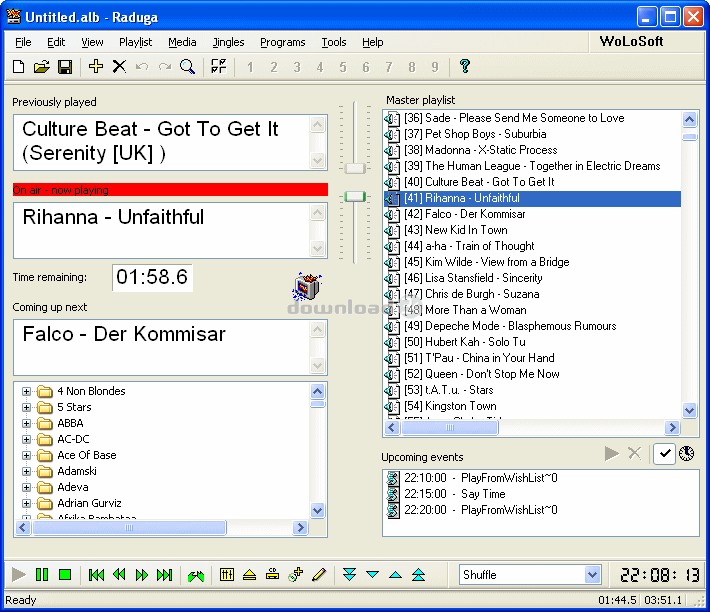
This program is mainly used to automate the music broadcast by shops, radio stations and clubs around the world. You can create playlists on the fly by dragging and dropping the music files into Raduga’s interface.
Here are the features that stand out:
- It minimizes to system tray and it displays the song currently played
- You can access a tray menu on right click for quick access to all important functions
- Extend the main functionality with add-ins which are easy to find, install or disable
- If you’re lazy, you can run it as it is, as soon as it has installed, all you need is music (that’s how easy it is to use)
- A nice crossfade effect when it changes songs
- Manage mini playlists which you can insert at any point
- Administer and set up advanced schedules (you can define which audio files need to be played, at what specific moment and for how long)
- Works with long filenames and it has support for UTF-8 characters
- Types of files supported: MP3, MP2, AVI, WMA, WAV, CDA, MID, MPG, RMI
Download Raduga if you want to automate your audio broadcasts.
Antivirus information
Download3K has downloaded and tested Raduga on 24 Jan 2013 with some of Today's best antivirus engines and you can find below, for your convenience, the scan results:
-
Avira:
Clean -
Kaspersky:
Clean -
NOD32:
Clean

Popular downloads in MP3 Audio Video
-
 Realtek High Definition Audio Driver for 2000/XP/2003 32/64-bit R2.74
High definition audio driver from Realtek. -
 3GP Player 2013 1.4
Free 3GP Player for Pc -
 iTunes 12.13.7.1
Manage and play your music collection. -
 Windows Media Player 11
One of the best media player -
 Total Video Converter 3.72
Total Video Converter -
 TVexe TV HD 6.0
Watch free live TV on your PC now+ Radio -
 K-Lite Codec Pack Full 18.9.0
A collection of codecs and related tools. -
 Windows Media Player 9 Codecs Pack
The latest Windows Media codecs -
 VLC media player 3.0.21
A portable app of VLC media player. -
 KMPlayer 4.2.3.21 x86 / 2025.1.21.12 x64
A movie and audio player.
User rating
3.5/5 (8 votes)
Good
Your rating

-
OS
Windows All -
License
Demo -
Price
$99 -
Updated
1/24/2013 -
Downloads
1630 (1 last week) -
Size
2.90 MB -
MD5
7c9d7e5681ad48a8256d9154184e6698 -
SHA1
46c09bfac7c6738e277f9c9dda6ad6aa8e64f96d -
Developer
WoLoSoft International