CodeTwo Outlook Reply All Reminder 1.0.1
Developed by CodeTwo
-
Windows
-
setup file C2OutlookReplyAllReminderEN.exe (9.87 MB)
-
Freeware
Select a download mirror:
- Developer Link 1 (non https C2OutlookReplyAllReminderEN.exe)
- Download3k US (C2OutlookReplyAllReminderEN.exe)
- Download3k EU (C2OutlookReplyAllReminderEN.exe)
MD5: c51e54e685a80d7cab26c9bfec91eade
All files are original. Download3K does not repack or modify downloads in any way. Check MD5 for confirmation.
Developer Description
"Reminds to respond to all recipients."
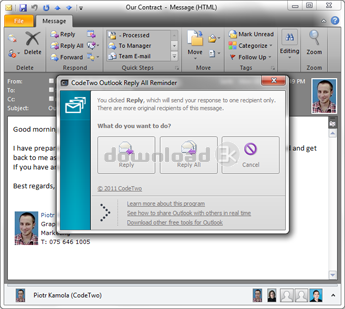
CodeTwo Outlook Reply All Reminder has been created to prevent Outlook users from accidental excluding other recipients (specified in the Cc: or To: fields) when replying to a group message. It may happen to everyone to forget to hit the Reply instead of the Reply All button, but when it comes to business group correspondence, skipping an important recipient may cause a lot of trouble.To solve this problem CodeTwo programmers created CodeTwo Outlook Reply All Reminder. You do not have to configure it after the installation. CodeTwo Outlook Reply All Reminder will be added to your Outlook Add-ins, ready to activate an alert in the right moment. After you click Reply, when responding to a group correspondence, the plugin will trigger a notification window informing that your message will be received by one person only. In the newly open window you can select the Reply All button to send the message to all original recipients.
Installation:
CodeTwo Outlook Reply All Reminder is a typical 'install and forget' program. Within a few seconds you can equip your Microsoft Outlook with this handy add-in without worrying about setting it up. Just download the program from CodeTwo's website to your computer and install it, making sure your Outlook is closed during the installation process. Once you launch your Outlook again, you will not notice any changes in your mail client except the new plugin added to the Outlook Add-ins list. From this moment you can send your e-mails freely and rest assured the application will notify you when it is necessary.
Requirements: Microsoft Outlook 2010 / 2007 / 2003; Microsoft Windows 7 / Vista / 2003 / XP; NET Framework 2.0
What's new in this version: This is the first version of the program.
Antivirus information
Download3K has downloaded and tested CodeTwo Outlook Reply All Reminder on 22 Oct 2013 with some of Today's best antivirus engines and you can find below, for your convenience, the scan results:
-
Avast:
Clean -
Avira:
Clean -
Kaspersky:
Clean -
NOD32:
Clean

Popular downloads in Internet
-
 Google Talk 1.0.0.105
Google chat messenger with voice. -
 Motorola Phone Tools 5.0
Motorola Phone Tools kit. -
 Download Accelerator Plus 10.0.6.0
DAP 10: For the fastest downloads. -
 Opera Mini for Java 8.0.35626
A fast and tiny Web browser. -
 Firefox 138.0.3 / 139.0b7 Beta 7
The award winning Web browser. -
 YMulti Messenger 2.0.0.100
Multiple Yahoo Messenger instances - same pc. - Skype 8.150.0.125 / 7.41.0.101 Classic / 8.138.0.214 MS
Talk with your friends for free. -
 InternetDownload Manager 6.42.64
Accelerate, resume and schedule web downloads -
 Google Chrome 136.0.7103.114 / 137.0.7151.15 Beta / 138.0.7166.3
Minimal design with sophisticated technology. -
 UC Browser for Java 9.5.0.449
A Web and WAP browser.
User rating
0/5 (0 votes)
Your rating

-
OS
WinXP,WinVista,WinVista x64,Win7 x32,Win7 x64,Windows2003,Windows Vista Ultimate,Windows Vista Ultim -
License
Freeware -
Price
$0 -
Updated
10/22/2013 -
Downloads
47 (4 last week) -
Size
9.87 MB -
MD5
c51e54e685a80d7cab26c9bfec91eade -
SHA1
4a9685bba491d5a7b3d8d52a4b14b12887dbe6ac -
Developer
CodeTwo