VITimer 2.0
Developed by Valeri Vlassov
-
Windows
-
setup file Setup_VITimer.zip (4.55 MB)
-
Demo
Buy or select mirror:
- Buy $12
- Developer Link 1 (non https Setup_VITimer.zip)
- Download3k US (Setup_VITimer.zip)
- Download3k EU (Setup_VITimer.zip)
MD5: c7d234bbfd162ce5c6b1a9f4b90394e0
All files are original. Download3K does not repack or modify downloads in any way. Check MD5 for confirmation.
Developer Description
"Clock Timer with a list of Tasks"
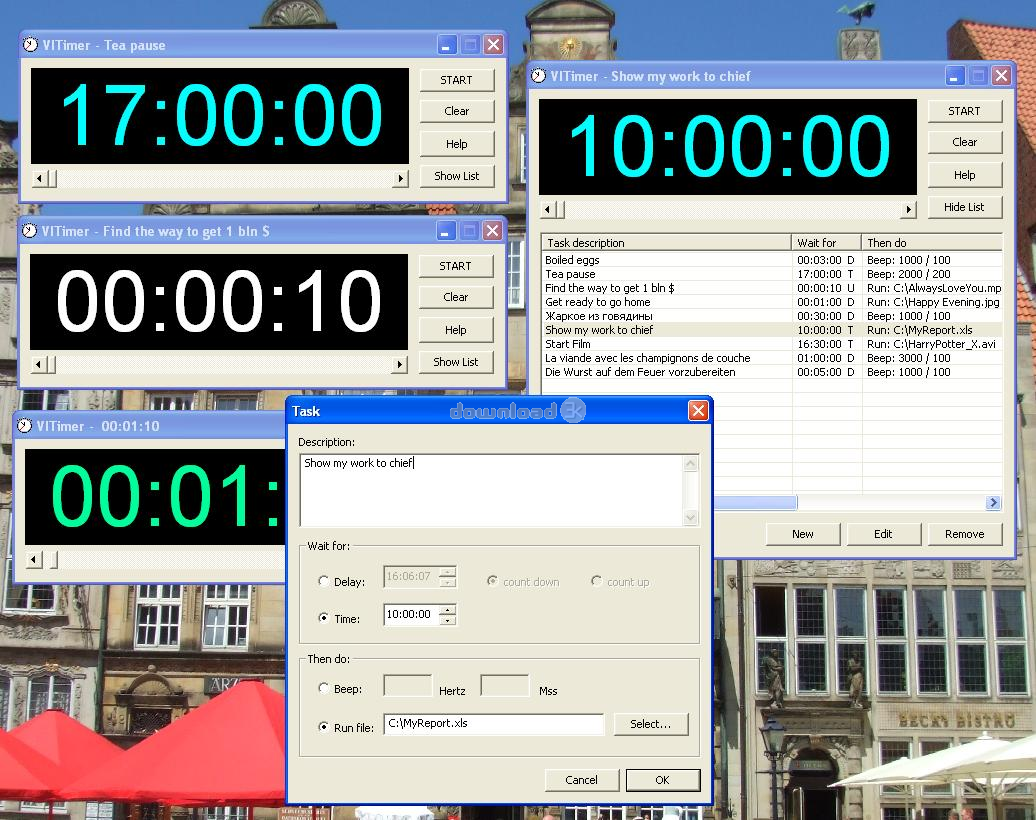
- drag scroll bar to the right to set delay time in seconds (from 1 sec to one hour)- after count down to zero a beep will be played
- use keyboard keys (Left or Right arrows) for adjust delay time (if you need)
- use button "Clear" to set delay time to zero
- use button "Stop" to stop count down (the Delay time will be set to the previous value).
- press the button "Show List" to open the list of Tasks
- press the button "New" (or double click at an empty row)
- input "Task description", for example "boiled egg"
- select "Wait for:" (wait for delay elapsed or for day's time)
- if you have selected "Wait for Delay", input Delay as "hh:mm:ss", for example "00:03:00" for 3 minutes or "23:59:59" for 24 hours
- select "Count Up" or "Count Down"
- if you have selected "Count Down", the time will be counted down from Delay value to zero
- if you have selected "Count Up", the Delay will be counted up from zero to Delay value
- if you have selected "Wait for Time", input the Time to wait for as "hh:mm:ss", for example "21:30:00" for waiting till 09:30 pm
- select "Then do:" (what to do when the Delay will be elapsed or the day's Time will be reached)
- if you have selected "Beep", the Beep tone will be played (with according Frequency in Hertz and duration in Milliseconds)
- if you have selected "Run file", select a file to start when Delay is elapsed (or day's time is reached)
- you can select any files to run (music, video, pictures, applications etc), for example "best song.mp3", "Sunrise.jpg", "Account.doc", "Year Report.xls" etc
- your computer will start the according program to play selected file, for example MS Paint for pictures, MS Player for video, MS Excel for xls etc
- to EDIT a Task in the List double click at it or press Blank key
- to DELETE a Task(s) in the List select one or more Tasks and press Delete
What's new in this version: No changes
Antivirus information
Download3K has downloaded and tested VITimer on 29 Aug 2023 with some of Today's best antivirus engines and you can find below, for your convenience, the scan results:
-
Avast:
Clean -
Avira:
Clean -
Kaspersky:
Clean -
McAfee:
Clean -
NOD32:
Clean

Popular downloads in Business & Finance
-
 Website Builder 9.0
This web site builder gives you everything y -
 PDF to Word | Solid Converter 10.1
Convert PDF to Word -
 Real Estate Price Calculator 3.0.1.5
Lands area length converter price calculator - Face Recognition System 2.0
Matlab source code for Face Recognition. -
 WPS Office Free 12.2.0.20326
Perfect free for creating & editing documents -
 XLS (Excel) to DBF Converter 3.16
Allows you to convert XLS files to DBF format -
 vCard Wizard 4.25
Transfer any Contacts. vCard vcf converter - Bill Maker 1.0
Bill, Invice, Inventory management -
 OEE 2
OEE 2
OEE calculator for MS Excel -
 Foxit Reader 10.0.0.35798
Protects Against Security.The Best PDF Reader
User rating
0/5 (0 votes)
Your rating

-
OS
Win98,WinME,Windows2000,WinXP,Windows2003,Windows Vista Home Basic -
License
Demo -
Price
$12 Buy -
Updated
8/29/2023 -
Downloads
119 (1 last week) -
Size
4.55 MB -
MD5
c7d234bbfd162ce5c6b1a9f4b90394e0 -
SHA1
2aeaa44b06d7888fa46f1e47cd3b0d1c4f9100bb -
Developer
Valeri Vlassov