odbc2xls 3.1.1
Developed by BitDaddys Corp.
-
Windows
-
setup file odbc2xls-trial-setup.exe (493.58 KB)
-
Shareware
Buy or select mirror:
- Buy $10.00
- Developer Link 1 (non https odbc2xls-trial-setup.exe)
- Developer Link 2 (non https odbc2xls-trial-setup.exe)
- Download3k US (odbc2xls-trial-setup.exe)
- Download3k EU (odbc2xls-trial-setup.exe)
MD5: 510faf84fe183d408888eb345b427102
All files are original. Download3K does not repack or modify downloads in any way. Check MD5 for confirmation.
Developer Description
"odbc2xls ODBC To Excel, CSV, XML, HTML"
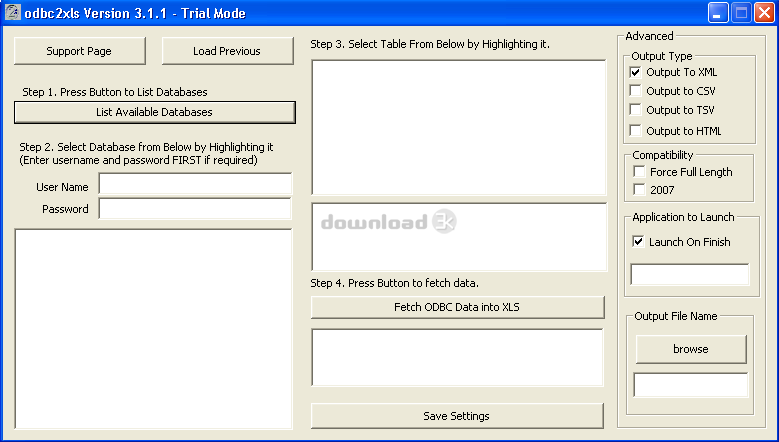
O2X (odbc2xls) offers the user a simple, fast and effective method to extract ODBC Table Data from the localODBC driver into an Excel XML based Spreadsheet or CSV (comma seperated values) data file or HTML Table.
With an easy to use windows interface, the user just selects an ODBC database and table and then presses one
button to fetch the entire contents into a ready to use excel (xml based) spreadsheet or other data file driven
display. You can save a session for later repeated use! The user can even opt for csv export for maximum
compatibility or modify the default SQL for optimum results! You can even execute silently from your own application!
You can easily select what application to launch at the end of the data extraction, or specify to not launch any
application at all. You may even specify to create a specific output file name instead of the unique default. With
O2X you can even create a csv file from sql from within your application, and launch any application that accepts
csv as an input ... transparently to your user! With the new HTML out option, you can save a tremendous amount
of time on your next web based data presentation project! The HTML generated is clean and ready to use as a
standalone page or as an inclusion in your larger pages.
What's new in this version: Added HTML output, Excel 2007 Compatibility and improved silent mode.
Antivirus information
Download3K has downloaded and tested odbc2xls on 29 Mar 2012 with some of Today's best antivirus engines and you can find below, for your convenience, the scan results:
-
Avira:
Clean -
Kaspersky:
Clean -
NOD32:
Clean

Popular downloads in Business & Finance
-
 Website Builder 9.0
This web site builder gives you everything y -
 PDF to Word | Solid Converter 10.1
Convert PDF to Word -
 Real Estate Price Calculator 3.0.1.5
Lands area length converter price calculator - Face Recognition System 2.0
Matlab source code for Face Recognition. -
 WPS Office Free 12.2.0.20326
Perfect free for creating & editing documents -
 XLS (Excel) to DBF Converter 3.16
Allows you to convert XLS files to DBF format -
 vCard Wizard 4.25
Transfer any Contacts. vCard vcf converter - Bill Maker 1.0
Bill, Invice, Inventory management -
 OEE 2
OEE 2
OEE calculator for MS Excel -
 Foxit Reader 10.0.0.35798
Protects Against Security.The Best PDF Reader
User rating
0/5 (0 votes)
Your rating

-
OS
Win95,Win98,WinME,WinNT 3.x,WinNT 4.x,Windows2000,WinXP,Windows2003,WinME -
License
Shareware -
Price
$10.00 Buy -
Updated
11/11/2011 -
Downloads
465 (1 last week) -
Size
493.58 KB -
MD5
510faf84fe183d408888eb345b427102 -
SHA1
78f266fa1dccc268f90950181b5900fc0ac64661 -
Developer
BitDaddys Corp.